In this article 14 sections
- Why the second item is worth asking about
- The cross-sell map: six order types
- Build your own version from past orders
- Three rules that keep it helpful
- Ask once, at the quote or proof stage
- Offer one or two items, not the whole range
- Put it in writing, with a price
- Check two things before you suggest anything
- The in-hands date
- The decoration method
- What the extra line is worth
- Keep your normal price on the add-on
- Track one number: your attach rate
- Make it a habit this week
A customer orders 100 tees for their company 5K. A few weeks later you see photos from the day: your shirts, someone else’s banner, and a pile of tote bags from an online store. Nobody at your shop asked about the rest of the event, so the customer bought it somewhere else.
Cross-selling here means a different item that finishes the same job, not a bigger version of what they ordered, and it needs no sales script. You need a short map of what goes with each common order type, one question about the customer’s event, and the extra item sent as its own priced quote, offered once. Below is that map for six order types, plus the checks that keep a good suggestion from turning into a missed deadline.
Why the second item is worth asking about
When a customer buys the tote bags elsewhere, you lose more than one sale. You already have their approved artwork, their contact, their in-hands date and their trust. A second item using the same artwork needs a resize check and a setup, not a whole new design conversation. That means it can earn a better margin than a new order of the same size.
The cross-sell map: six order types
Each row shows what the buyer is really trying to do, two or three companion items that can reuse the artwork you hold, one question to ask, and the check to run before you offer anything. Pin it up by the quoting desk so everyone asks the same question for the same order type.
| Order type | What the buyer really wants | Companion items | The one question | Check first |
|---|---|---|---|---|
| Event tees (5K, fundraiser, company day) | A day that looks organized and a keepsake for attendees | Tote bags, lanyards, step-and-repeat banner | “Where will people check in or take photos on the day?” | Tote print area is smaller than a tee front; confirm the art scales down |
| Staff uniforms and workwear | A team customers recognize and trust | Caps, outerwear, name badges | “Do any of your team work outdoors, or deal with customers by name?” | A logo built for print may need simplifying for cap embroidery |
| Trade show booth graphics | Visitors who stop, remember and follow up | Table throw, giveaways, staff polos | “What will your team hand someone once they stop at the booth?” | Shipping deadline for the venue; giveaway lead time |
| Business cards and stationery | Looking established to new clients | Presentation folders, notepads, mailing labels | “What do you leave with a client after a first meeting?” | Color match across different paper stocks |
| Grand opening or storefront signage | Foot traffic in the first few weeks | Window graphics, sidewalk A-frame, staff tees | “How will people walking past know about opening day?” | Install date, and any local sign rules the customer should check for themselves |
| Corporate gifts and onboarding kits | New hires who feel welcome on day one | Drinkware, notebooks, a cap or hoodie | “What does a new hire need in their first week?” | Sizes collected before you quote, packing time, drinkware decoration method |
Every question is about the customer’s event or goal.
Build your own version from past orders
The six rows above are a starting point. Your own order history is a better one. Pull the last 12 months of orders, sort them by customer, and look for pairs: tees bought with banners, or uniforms bought with caps. Those pairs show that your customers already want the set. Swap them into the map, and keep each row to three companions at most.
The same review will show repeat events and seasonal hiring coming up, good moments to raise the companion before the customer asks for a quote.
Three rules that keep it helpful
Ask once, at the quote or proof stage
The right moment is while the customer is still deciding: when you build the quote, or when you send the first proof. The timelines still line up, the artwork is fresh in everyone’s mind, and the extra item can ship with the main order. After the proof is approved, or once the job is on press, the same suggestion sounds like an afterthought and may miss the in-hands date.
Ask once. If they pass, drop it and note it on the account for next year’s event. Skip the offer entirely on an exact reorder, or when the buyer has said the rest is handled.
Offer one or two items, not the whole range
A list of eight “you might also like” items slows down the decision on the order they actually came in for. From the map, pick the one or two companions that best fit what they told you. If the customer mentions a check-in table, offer the banner. If they mention goody bags, offer the totes.
Put it in writing, with a price
A spoken “we also do mugs” is forgotten by the time your buyer takes the quote to their manager. Send the main quote at the total the buyer expects, and put the companion on a separate small quote with its own price. The buyer and whoever holds the budget see both totals, then opt in by name, with no second sales call.
The cover note can be short: “Your tee quote is attached as discussed. I’ve sent 150 tote bags with the same logo as a separate quote, in case runners need something to carry their packet in. Just reply ‘add the totes’ if you want them.”
Check two things before you suggest anything
The in-hands date
A companion item that arrives after the event is worse than no suggestion at all. Before you add it, confirm the lead time for the blank and the decoration, and check that it can run in the same production window as the main job. If the trade show is nine days away and the giveaway needs three weeks, pick a different companion or leave it out. For companions you buy in or subcontract, such as banners, A-frames, window graphics or drinkware, confirm your partner’s lead time too and build your markup into the line.
The decoration method
Artwork that works on a tee doesn’t always carry over. A full-color logo built for DTF (direct-to-film transfers) or sublimation may need simplifying before it can be embroidered on a cap. Check the art against the new method and size before you quote, and price any digitizing or redraw into the line so it doesn’t come out of your margin later. Decoration pricing: the hidden margins in setup and run charges shows how those charges add up.
What the extra line is worth
Worked example
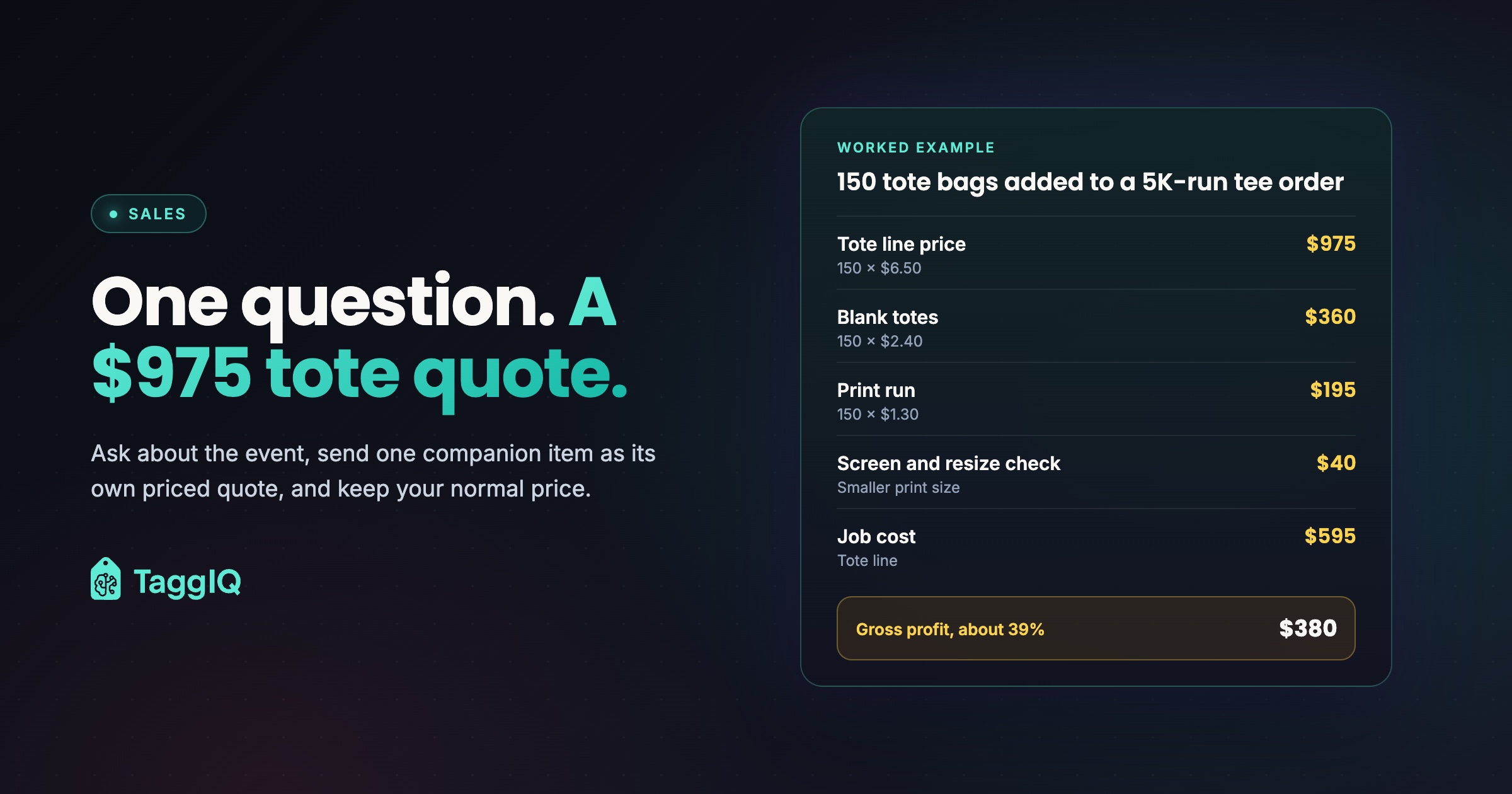
A runners’ club orders 100 one-color tees for its annual 5K at $12 each, a $1,200 order. The club expects about 150 runners at check-in but is giving tees only to the first 100 who registered. At the quote stage, the rep asks where runners will collect their packets. The answer is a check-in table, so alongside the $1,200 tee quote the rep sends a separate quote: 150 cotton tote bags, printed one color with the same logo, at $6.50 each.
- Tote line price: 150 × $6.50 = $975
- Blank totes: 150 × $2.40 = $360
- Print run: 150 × $1.30 = $195
- Screen and resize check for the smaller print size: $40
- Job cost for the tote line: $595
- Gross profit on the line: $975 less $595 = $380, about 39%, before overhead
If the club opts in, the order grows from $1,200 to $2,175 on the same proof cycle. If the rep had taken 10% off the totes without being asked, the line would drop to $877.50 and gross profit to $282.50. That is about a quarter less profit on an item the club might have taken at full price. All figures are illustrative; use your own costs.
Keep your normal price on the add-on
The customer may well accept the extra item at your normal price. Discounting it by reflex hands back margin nobody asked for. If you want to reward a bigger order, show quantity break pricing so the buyer can see how ordering more changes the unit price, and let them decide.
Track one number: your attach rate
Here, attach rate means the share of companion quotes the customer accepted. Count it monthly, split it by order type, and compare it with your own starting point. That shows which rows of the map are working and which questions need rewording. Check it against your offer rate, the share of eligible quotes that got a companion quote, so the attach rate can’t rise just because reps only offer to likely yeses.
Worked example
In October the shop sends 40 companion quotes. Customers accept 9 of them. Attach rate: 9 ÷ 40 = 22.5%. In November the team rewrites the trade show question, then compares November’s trade show rate with October’s. Figures are illustrative.
Make it a habit this week
- Print the map and change any companion items your shop can’t produce or source well.
- Check last year’s orders and swap in any pairings your customers already buy.
- Agree on one question per order type and have every rep ask it at the quote stage.
- Send the companion as a separate priced quote, and order its blanks only once the buyer confirms it by name.
- Start counting your attach rate on Monday.
If you quote in TaggIQ, you can search connected supplier catalogs from inside the quote builder and add a companion product to a quote in one click, with stock shown where the supplier feed provides it. Send each quote as its own shareable, login-free presentation, and the buyer approves the main quote and the add-on separately with one click each. Distributors can see how this fits their workflow on the promotional products page.
See TaggIQ quotes Build quotes from connected supplier catalogs and send them for one-click online approval.
Frequently asked questions
How is cross-selling different from upselling?
Upselling means a higher spec or a bigger quantity of the same item, such as heavier tees or 150 instead of 100. Cross-selling means a different item that finishes the same job, such as totes to go with the tees. Keep them as separate conversations. If you push a bigger tee quantity and a banner at the same time, the buyer has two decisions to make instead of one.
What if the customer's budget is already tight?
Keep the companion on its own quote so the main order total stays unchanged, and offer a smaller version that still serves the goal, such as caps for the six staff working the day instead of for every attendee. If the budget is fixed, ask whether they would rather spread it across the set. Trimming ten tees to pay for a banner can make the whole event look better for the same spend.
What should I do if they say no?
Accept it in one line and carry on with the main order. Note on the customer record what you offered and why they passed, such as "banner already sourced" or "maybe next year." When the event comes around again, that note gives the rep a natural reason to ask, without repeating a pitch the customer has already turned down.

Dave
Dave writes for TaggIQ about running a profitable print, promo, sign and embroidery business: costing and estimating, margins, production flow, order workflows, pricing decisions and keeping customers coming back.