In this article 13 sections
- Why buyers would rather look than ask
- The five things buyers want to check themselves
- Rank them for your shop with a fortnight's tally
- The default order, and why
- 1. Proof approval
- 2. Order status
- 3. Invoices and payment
- 4. Open quotes
- 5. Size collection for team orders
- Launch it so customers actually use it
- What the portal should not replace
- Where TaggIQ fits
- Your next step this week
A customer rings to ask whether you got their proof approval. Another emails for the invoice you sent last Tuesday. A third wants to know if their hoodies have gone to print, so someone walks to the floor to find out. None of these people need advice. They need to see something you already have.
The short answer: buyers want five things they can check without asking. Those are their proof, their order status, what they owe, their open quotes and, for team orders, the size list. Switch them on in the order that removes the most calls and the most waiting in your shop. For most print, embroidery and promo businesses, that starts with proofs and status.
Why buyers would rather look than ask
Business buyers have been moving towards self-service for routine steps. A Gartner survey of 646 B2B buyers, run from August to September 2025 and reported by Digital Commerce 360, found that 67% favour a rep-free buying experience and 45% had used AI tools during a recent purchase. The same research expects sales reps to stay involved mainly in later stages, such as support on complex deals.
That does not mean your customers want to stop emailing you. YouGov’s research on British customer service preferences found that email (33%) and phone (31%) are the most preferred channels, and also the most used, at 74% and 65%. Only 1% prefer chatbots and 2% prefer apps. Preference also shifts with age: half of the Silent Generation name phone as their top channel, against 16% of Gen Z.
Neither survey is about print or promo buyers. Gartner asked B2B buyers about purchasing, and YouGov asked the British public about customer service. Read together, though, they point to a sensible working assumption for a UK shop: many of your customers would probably rather check routine things for themselves, but most will still start from an email. On that reading, a portal that relies on people downloading something, or remembering a password, is likely to work against both habits.
The five things buyers want to check themselves
Most of the routine questions that land in a shop’s inbox fall into five groups. Each one costs you something different. Some only cost staff time. Others hold up production or cash.
| What the buyer wants | The call or email it triggers | What the wait holds up |
|---|---|---|
| Proof | “Did you get my approval?” “Can you resend the proof?” | A production slot |
| Order status | “Where is my order?” “Has it gone to print?” | Staff time only |
| What they owe | “Can you resend the invoice?” “What’s the balance?” | Cash |
| Open quotes | “Is that price still valid?” “Can you send it again?” | Won work, then cash |
| Sizes for team orders | “Who still hasn’t sent theirs?” “Can I change mine?” | Production, plus remakes if wrong |
In most shops these things arrive scattered. Proofs, quotes and invoices go out as separate emailed links or PDFs, so the customer’s view of one order is spread across several messages. Status is given on request, often after someone checks the production board or asks the floor. Sizes come in by spreadsheet or long email chains, with one contact chasing colleagues. A portal earns its place by pulling those threads together in one place.
Rank them for your shop with a fortnight’s tally
The right order depends on your customer mix, so measure before you switch anything on. For two weeks, ask whoever answers the phone and inbox to log every inbound enquiry against one of the five types above. A tally sheet by the phone works. So does a shared spreadsheet with five columns.
Then weight each type by what the wait costs:
- Weight 1: costs staff time only.
- Weight 2: delays cash, through an unpaid invoice or an unanswered quote.
- Weight 3: delays production or risks a remake.
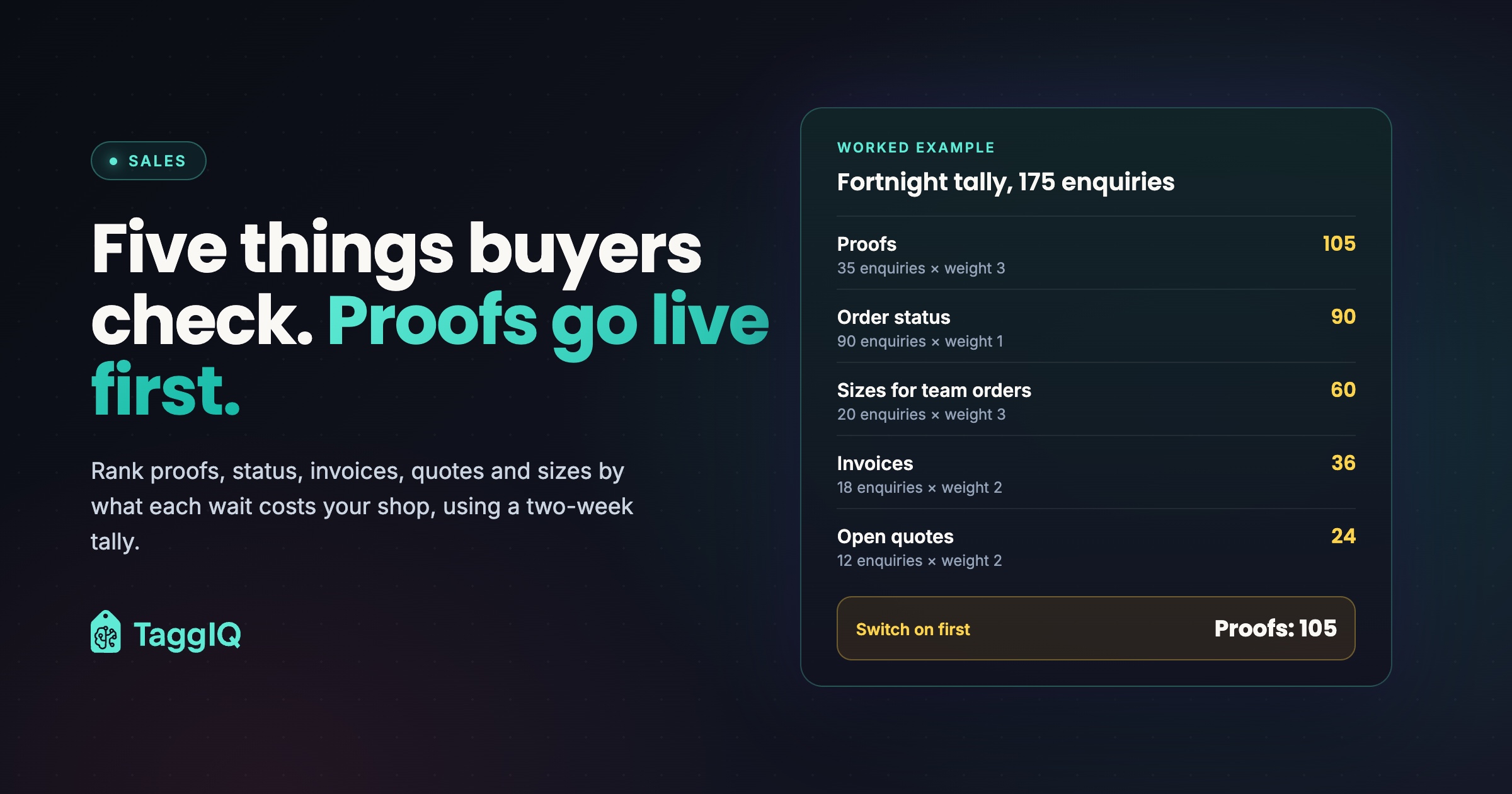
Multiply each count by its weight. The highest score goes live first.
Worked example
These figures are illustrative. A shop handling 60 active orders a month, with a lot of club and workwear kit, logs 175 enquiries over a fortnight: 90 about status, 35 about proofs, 20 about sizes, 18 about invoices and 12 about quotes. The weighted scores are proofs 35 × 3 = 105, status 90 × 1 = 90, sizes 20 × 3 = 60, invoices 18 × 2 = 36 and quotes 12 × 2 = 24. At about 4 minutes per enquiry, including checking production, the fortnight took 700 minutes of office time, or 11 hours 40 minutes. Status alone took 360 minutes, or 6 hours. Proofs come out on top despite fewer calls, because each proof that sits in an inbox for one to two days pushes back a production slot. Because this shop does so much team kit, sizes move up to third, ahead of invoices.
A sceptical owner should note two things about that example. First, those hours don’t come off the wage bill. They’re overhead time you get back for quoting, follow-up and selling. Second, the count is a minimum. It only captures customers who bothered to ask, not the ones who waited quietly and approved late.
The default order, and why
If you can’t run a tally, this sequence is a sensible starting point for most decorated apparel, print and promo shops. It’s a suggested rule of thumb based on the weighting above, not survey data.
1. Proof approval
Proofs are where waiting costs the most. An approval stuck in an inbox holds up a production slot, and the “did you get it?” email adds another round trip. Let customers approve or request changes from their phone, with the decision recorded against the job and earlier versions still visible. That record matters when someone later says they never signed off the colour. There is more on this in why email approvals go wrong.
2. Order status
In many shops, status enquiries are the most frequent and the least valuable. The trap is showing your internal stages. “Digitising”, “hooped” or “awaiting blanks” mean nothing to a buyer, and they make a stalled job look worse. Shops already translate internal stages into simpler updates such as “in production” or “dispatched”, and the portal should show only those customer-facing steps. It also has to stay up to date. A status page that is a day behind teaches customers that phoning is more reliable.
3. Invoices and payment
Show what is owed and let customers pay when there’s a balance due. Deposit chasing and payment reminders usually fall to the office by email and phone, so this is where self-service affects cash flow. This is general guidance only. Check your own payment terms and invoicing obligations with your accountant, because the portal changes how customers get to an invoice, not what the invoice has to contain.
4. Open quotes
Routine repeat work, like the same polos reordered for new starters, often just needs a yes. Letting buyers accept or decline an open quote cuts follow-up emails and gets you a clear answer instead of silence. New or complex quotes still deserve a conversation.
5. Size collection for team orders
For a shop that does a lot of team kit, this can jump the queue, as the worked example showed. One link per order replaces the spreadsheet chain and gets names and sizes straight from the people who will wear the garments.
Worked example
Illustrative figures. On a 25-person staff uniform order where sizes trickle in by email over a week, one contact chases 24 colleagues and someone in the office retypes every reply. With a single link, each person enters their own size, and the office checks one list before ordering blanks. Less retyping means fewer wrong sizes and fewer remakes.
The size collection guide covers that workflow in more depth.
Launch it so customers actually use it
If a portal goes unused, look at how it was launched before you blame missing features. Watch for these:
- Everything on at once. Start with your top one or two items, check they work, then add the next.
- Password friction. A login nobody remembers sends people back to email. Signing in with a one-time emailed link suits UK buyers who already live in their inbox.
- Separate links that skip the portal. If proof and invoice emails don’t lead to the portal, habits never change. Every outbound email should point there.
- Leaky visibility. Costs, margins, drafts and internal notes must stay internal. Test the portal as a customer before you invite anyone.
- One channel for everyone. Phone-first buyers, who the YouGov figures suggest skew older, may need someone to walk them through the portal on a call the first time.
What the portal should not replace
The Gartner research expects reps to stay involved in the later, more complex stages of a purchase. In a print shop, that means fit, fabric, decoration method and specification. A portal is for routine checks. When a buyer asks whether a left-chest embroidery will sit right on a heavyweight hoodie, that needs a conversation. It will be a better one if your team hasn’t spent the morning answering “where is my order?”.
Where TaggIQ fits
TaggIQ’s customer portal covers all five items on this list. Customers see a ranked “Needs your attention” strip of pending proofs, unpaid invoices and open quotes. From their phone they can approve proofs or request changes, which are logged against the job with version history. They can also accept or decline open quotes and view invoices, with a Pay button that only appears when a balance is due and online payment is connected. The status timeline shows only the stages your staff mark as customer-visible, and size collection runs through one link per order. Customers sign in with a one-time email link, and setting a password is optional. You can turn the portal on or off for each customer, and costs, margin, drafts and internal notes stay hidden. To check the experience first, see what your customer sees in TaggIQ.
Your next step this week
Start the fortnight tally on Monday: five columns, one mark per enquiry, and weights applied at the end. Two weeks from now you’ll have your own priority list instead of a guess, and you’ll know which item to switch on first.
See the customer portal See how the TaggIQ customer portal puts proofs, status, quotes and invoices in one place for your customers.
Frequently asked questions
Will a portal stop customers phoning us?
Not completely, and it shouldn't try to. Routine checks move to the portal, and questions that need advice stay with your team. To see what has changed, repeat the tally a month after launch and check whether the item you switched on has dropped and the next one is now the biggest source of calls.
Do our customers need to create an account?
They shouldn't have to. Given how much UK customers rely on email, the smoothest route is a sign-in link sent to the address they already use with you, with a password as an option for those who want one. Every proof, quote or invoice email you send then doubles as a way into the portal.
Should we show every production stage so customers can see everything?
No. Customers want to understand where their job is, not to follow your floor. Four or five plain stages that are always up to date build more trust than twelve internal ones that lag behind. Choose the stages you can reliably update on the day they happen.
What if our biggest customer only uses the phone?
Keep answering the phone, and introduce the portal during a call you're already having. Walk them through approving their next proof while you're both on the line. Some customers will switch after one guided go, others never will, and both are fine as long as the routine questions from everyone else have moved.

Emma
Emma writes for TaggIQ about practical AI and automation for print, promo, sign and embroidery businesses: AI assistants and agents, quoting and follow-up workflows, customer experience and keeping people in charge of the decisions that matter.