In this article 12 sections
The demo went well. The AI turned a tidy brief into a neat quote in seconds. But your briefs are rarely tidy. They come as “50 polos, left chest logo, maybe a back print, need them Friday”, and the demo never showed what happens then.
The short answer: judge an AI tool on your own jobs, not the vendor’s sample data. Ask ten questions across five areas: data, accuracy, oversight, cost and exit. Score each answer from 1 to 3, run a trial on 20 real past quotes, and buy only if the time saved still beats the time spent checking.
Why the demo is the wrong test
A demo shows the tool at its best. The data is clean, the products are in the catalogue and the price breaks are simple. Your shop runs on exceptions: multi-decoration orders, odd quantities, customers on special pricing tiers, and briefs missing half the detail.
What matters is daily reliability. Does the tool cope when the brief is vague? Does it know your setup charges? Does it ask, or does it guess? You only find out by testing it on work you have already priced yourself, so you know the right answer.
The checklist: ten questions and what good answers sound like
Put these questions to every vendor, in writing if you can.
Data
1. Where is our data processed and stored, and how long is it kept? A good answer names the location, gives a retention period and points you to a written policy. A weak answer is “it’s all in the cloud, it’s secure”.
2. Is our customer data, artwork or price list used to train your models? A good answer is a clear yes or no, with the setting or contract clause that controls it. A weak answer is “we use data to improve the service” with nothing further. Ask too for a named list of sub-processors (the outside AI model providers the vendor uses) and a data processing agreement. A good answer is the list plus the agreement. A weak answer is “we use trusted partners”.
3. Can one customer’s data ever appear in another business’s results? A good answer explains how each business’s data is kept separate. A weak answer changes the subject to features.
The ICO’s guidance on AI and data protection covers accountability, accuracy, fairness and automated decisions, and notes it is under review following the Data (Use and Access) Act. Read it before you share customer records with any tool, and check your own obligations with an adviser.
Accuracy
4. How does it handle a brief with missing detail? A good answer: it flags what is missing or asks a question. A weak answer: it fills the gaps with a sensible guess. In a quote, a sensible guess about stitch count or print positions is a margin problem.
5. Will you let us trial it on our own past jobs? A good answer is yes, with your real price lists and pricing tiers loaded. A weak answer is a longer demo.
Oversight
6. What can the AI do without a person approving it? A good answer: it drafts, a person approves, then it sends. A weak answer: “it can run fully hands-off once you trust it”. Anything going to a customer, a supplier or your accounts should pass a person first. For where to draw that line, see what you should never let AI decide in your print shop.
7. Is there an audit log of what the AI did and when? A good answer shows you the log in the trial. A weak answer promises it is “on the roadmap”.
8. Can we limit what it has access to? A good answer lets you keep it away from payments, credit notes and tax fields. A weak answer gives the tool the same access as the account owner. The UK NCSC’s guidelines for secure AI system development are written for builders, but they show the kind of life-cycle thinking a serious vendor should be able to talk about, including systems built on third-party tools.
Cost
9. What is the full price at our volume? A good answer gives the subscription, any per-use or usage charges, add-ons, and what happens when you go over a limit. A weak answer quotes only the entry price.
Exit
10. If we leave, what do we take with us and how? A good answer names an export format and confirms cancellation terms before you sign. A weak answer is “customers don’t tend to leave”.
A scoring sheet you can copy
Score each answer 1 (weak or evasive), 2 (partial, needs follow-up) or 3 (clear, written, shown in the trial).
| Area | Questions | Your score (1 to 3 each) | Deal-breaker if scored 1? |
|---|---|---|---|
| Data | 1, 2, 3 | Yes for 2 and 3 | |
| Accuracy | 4, 5 | Yes for 5 | |
| Oversight | 6, 7, 8 | Yes for 6 | |
| Cost | 9 | No, but price it fully | |
| Exit | 10 | Yes |
Question 4 is tested directly by the trial in question 5, which is why only question 5 is a deal-breaker. A simple decision rule: any deal-breaker scored 1 ends the conversation, whatever the total. Otherwise, compare tools on total score and on the trial result below.

Run the trial on 20 of your own quotes
Pick 20 quotes you have already sent and know were priced right. Choose a mix on purpose: a few simple reorders, several multi-decoration jobs, some odd quantities that sit between price breaks, and two or three vague briefs.
Feed each original brief to the tool. For each draft, record two things: was the price right without correction, and how many minutes did it take a person to check and fix it? Name one person to own the trial and make the go or no-go call, so it does not drift.
Worked example
These figures are illustrative. Use your own.
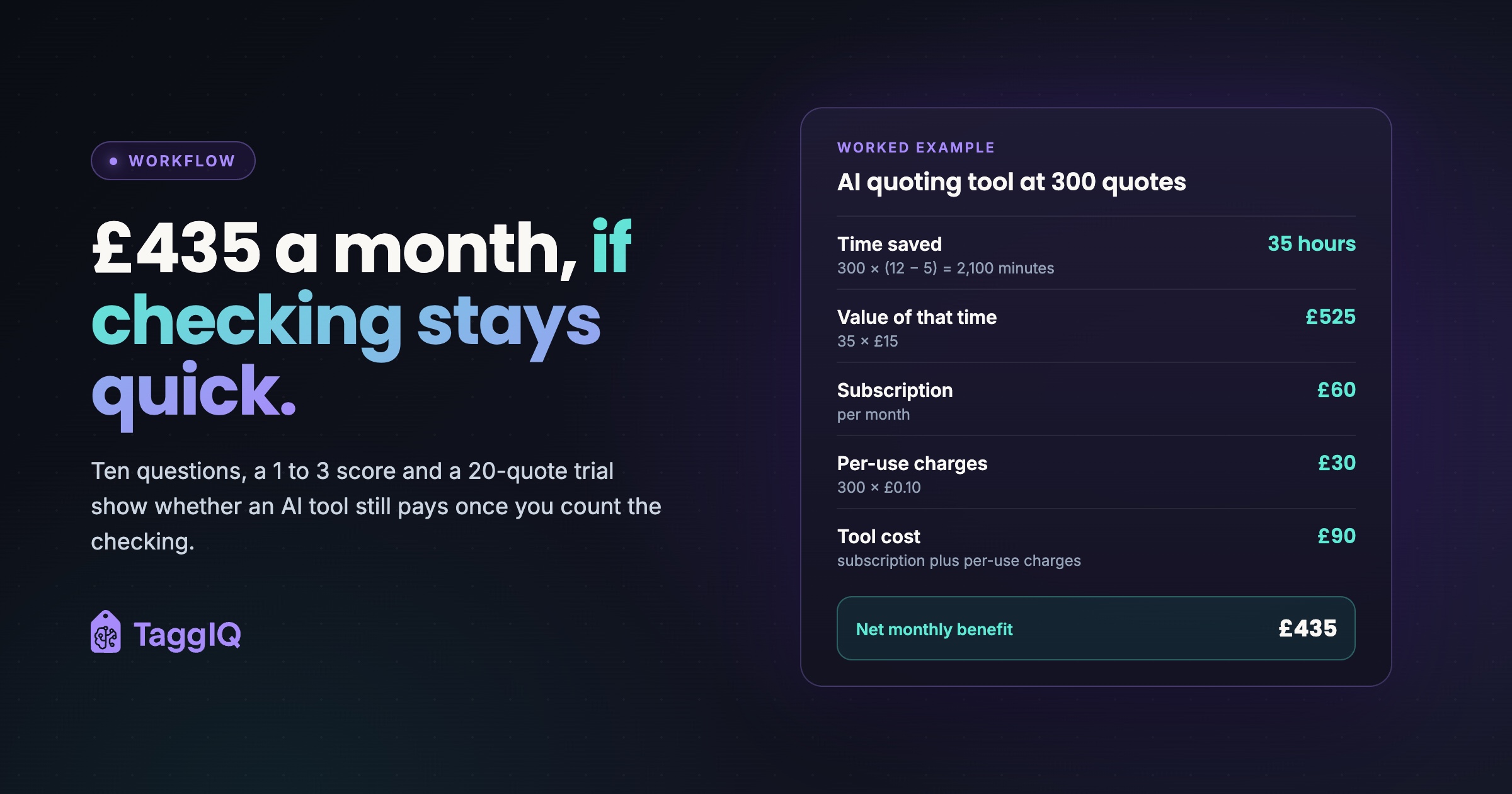
Trial result: of 20 past quotes, 14 came out right after a quick check, 4 needed a price break or setup charge corrected, and 2 were wrong enough to redo. Average time to prompt, check and fix: 5 minutes per quote, including the time to redo the two that were wrong. Doing the same quotes by hand takes about 12 minutes each.
Monthly picture at 300 quotes:
- Time saved: 300 × (12 − 5) = 2,100 minutes, or 35 hours
- Value of that time at £15 an hour: 35 × £15 = £525
- Subscription: £60
- Per-use charges at £0.10 per draft: 300 × £0.10 = £30
- Tool cost: £90
- Net monthly benefit: £525 − £90 = £435
The checking time is already inside the 5 minutes, so it is not counted again. Now test the weak spot. If checking rose to 10 minutes because staff stopped trusting the drafts, time saved would fall to 300 × 2 = 600 minutes, or 10 hours, worth £150. After £90 of tool costs, that leaves £60. The tool is only worth it if checking stays quick.
Two things to watch in your own numbers. First, usage charges grow with volume, so price the tool at next year’s quote count, not this month’s. Second, one wrong quote that slips through unchecked can cost more than a month’s subscription, which is why the approval step in question 6 is not optional.
Red flags that should slow you down
- The vendor will only demo on their own sample data.
- Nobody can say in writing whether your data trains their models.
- The tool can email customers or send quotes with no approval step.
- Pricing is “per seat” in the pitch but usage-based in the contract.
- There is no export, or export costs extra.
If you are weighing AI as part of wider quoting software, the honest buyer guide to quoting software for promotional products covers the rest of the decision. Distributors can also see how quoting, catalogues and orders fit together on the promotional products distributor software page.
How TaggIQ answers some of these questions
Put any tool through the same checklist, including ours. Here is what the TaggIQ AI page states today. The AI Co-Worker drafts quotes, including decoration setup and per-unit costs, for your approval. It can look up customers and pricing tiers, search supplier catalogues and check stock where supplier feeds provide it.
On oversight, the TaggIQ AI page states that external actions need a single-use approval link that expires in 24 hours, and every tool call is logged in an audit trail. The AI cannot create payments or credit notes or change tax fields. Sessions are bound to your organisation through a Personal Access Token, and the page states data never leaks across organisations.
The page does not currently set out data retention, encryption or processing location. Ask us those questions directly, as you would any vendor. Some agents on that page are marked as a proposed build and are not yet available.
See TaggIQ AI See what the TaggIQ AI Co-Worker drafts, and the approval and audit steps around it.
Your next step this week
Pull 20 past quotes, send your shortlisted vendors the ten questions, and book a trial on your own data. If a vendor will not trial on your jobs, that is your answer.
Frequently asked questions
How long should an AI trial run before we decide?
Long enough to run your 20 test quotes and a week or two of live drafts with approval switched on. The aim is to see how checking time behaves once the novelty wears off, not just on day one.
Should staff know their checking time is being measured?
Yes. Tell them the trial is measuring the tool, not them. Ask them to note every correction, because those notes show you exactly where the tool is weak.
What if two tools score the same?
Choose the one that scored better on exit and oversight. Features can be added later. A tool that is hard to leave or hard to control is much harder to fix.
Do we need a data protection review before trying an AI tool?
That depends on what data you share and how. Start with the ICO's guidance on AI and data protection, and check your own obligations with an adviser before loading real customer records.

Emma
Emma writes for TaggIQ about practical AI and automation for print, promo, sign and embroidery businesses: AI assistants and agents, quoting and follow-up workflows, customer experience and keeping people in charge of the decisions that matter.