In this article 11 sections
- Why price, promises and exceptions are the line
- Your name is on whatever goes out
- Three labels for every decision
- The responsibility map: ten everyday decisions
- What the review step actually costs
- The two ways it goes wrong
- Blind trust
- Fear
- One job AI should never do: your reviews
- Put your map on one page this week
- Where TaggIQ fits
You’ve started letting AI draft quotes and follow-up emails, and it is fast. Some mornings that speed feels like a gift. Other mornings you picture a confident draft going out with the wrong price, or with a ship date nobody checked. So you end up either checking everything twice or quietly not checking at all.
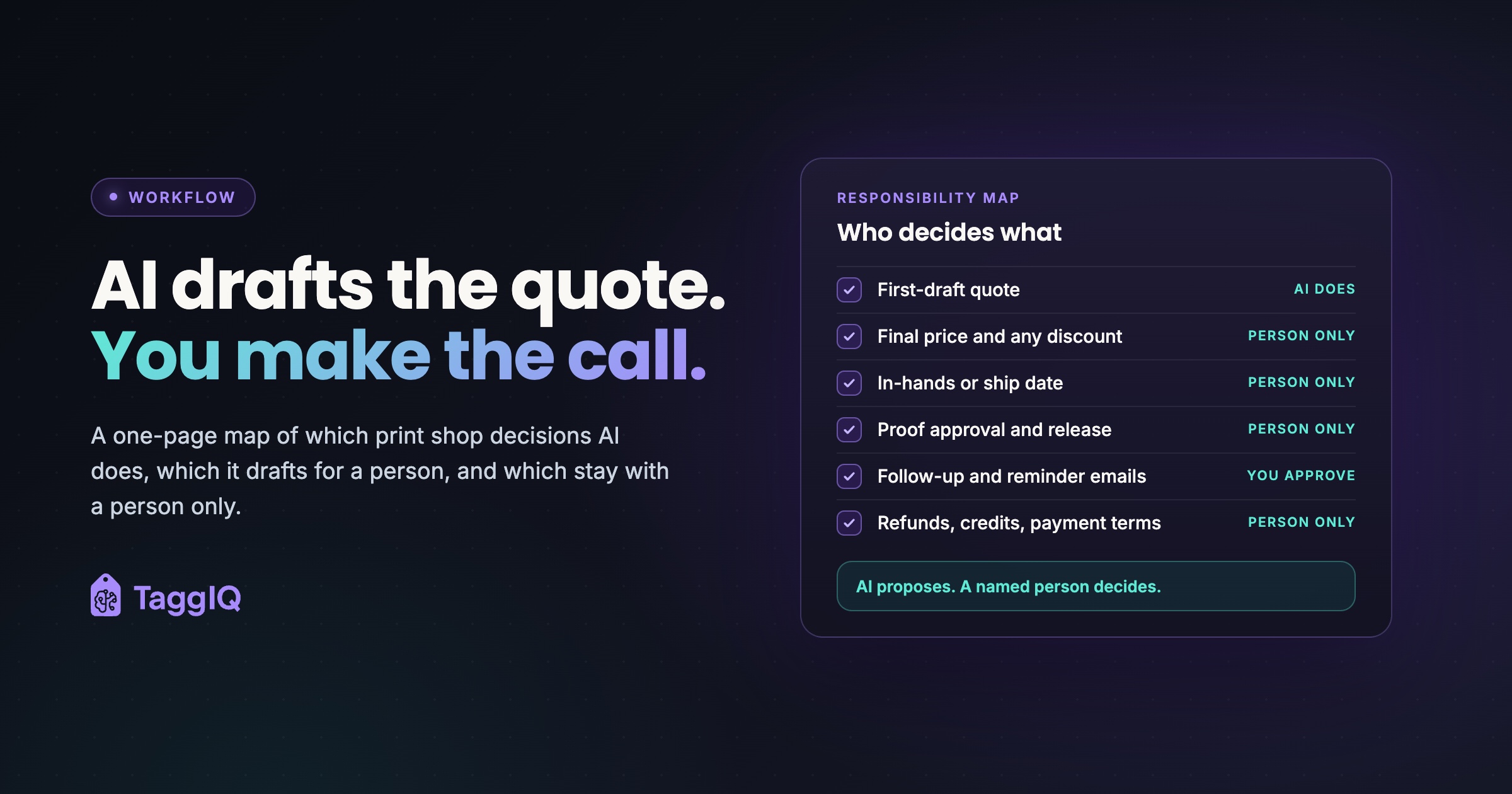
Here is the short answer. Let AI propose, and keep people in charge of three things: price, promises and exceptions. Everything else fits on a one-page map. For each common decision, the map says whether the AI does it, drafts it for a person, or stays out of it.
Why price, promises and exceptions are the line
Most AI work in a shop is drafting and lookup: a first-draft quote from past jobs, a reminder email, a summary of a customer’s history, a search for a blank in a supplier catalog. If one of those drafts is slightly off and someone reads it before it goes anywhere, fixing it takes a minute.
Three kinds of decision are different, because one wrong call costs real money:
- Price. An underpriced job loses margin on every piece, and you usually find out after it has shipped.
- Promises. An in-hands date that was never checked against the schedule turns into rush costs, overtime or a remake.
- Exceptions. Waived rush fees, discounts, credits and payment terms give away goodwill or cash, often to the very customers who most need a firm hand.
These decisions also depend on context that rarely lives in the data. Think of the negotiated deal with the school district, the customer on credit hold, or the press that is down until Thursday. That knowledge sits in someone’s head. An AI applying the normal tier price cannot see it.
Your name is on whatever goes out
Your customer reads a message from your shop as your shop’s word, whoever or whatever drafted it. If a draft mentions a price or a date, the customer will expect you to stand behind it, and it is your reputation on the line when you can’t.
So make it a house rule: a named person approves anything customer-facing before it is sent. AI drafts get the same treatment as proofs and a new estimator’s quotes.
Three labels for every decision
The idea has formal backing. NIST’s AI Risk Management Framework, a voluntary framework released in January 2023, calls for policies that “define and differentiate roles and responsibilities for human-AI configurations and oversight of AI systems.” This is human oversight of AI in practice: a named person owns each decision. For a 10-person shop, that comes down to one page and three labels:
| Label | What it means | Example |
|---|---|---|
| AI does | The AI acts on its own because nothing leaves the shop and nothing changes in the books | Looking up a customer’s last three orders |
| AI proposes, person decides | The AI drafts. A named person reviews, edits and approves before anything is sent or committed | A follow-up email on an open quote |
| Person only | A person makes the call. The AI may supply information but does not recommend the outcome | Accepting a rush job |
You probably already work this way without AI. A junior estimator drafts and a senior person signs off on price. A proof goes to the customer before production. A manager approves credits. AI slots into approval gates you already trust.
The responsibility map: ten everyday decisions
Here is a starting map for a typical decorated-apparel, promo or print shop. Change the labels to suit your shop, and add a column with the name of the person who owns each decision.
| Decision | Label | What AI can contribute |
|---|---|---|
| First-draft quote | AI does (internal only) | Pulls customer history, applies the tier, adds decoration charges |
| Final price and any discount | Person only | Shows the tier price and past prices for this customer |
| In-hands or ship date promised to a customer | Person only | Reports current production status |
| Accepting a rush and bumping other work | Person only | Lists what is already scheduled that week |
| Releasing a job to production after customer proof approval | Person only | Drafts the proof-approval email, which a person approves before it is sent |
| Remake or reprint after a complaint | Person only | Summarizes the order, proof and messages |
| Refunds, credit memos and payment terms | Person only | Lookup only |
| Follow-up and reminder emails | AI proposes, person decides | Drafts the message and the list of who is due |
| Accepting customer-supplied or AI-generated artwork that may involve trademarks or copyright | Person only | Flags recognizable logos, licensed characters or a missing usage permission |
| Blank or supplier substitution when stock is short | AI proposes, person decides | Searches catalogs for close alternatives |
Plenty of other internal jobs belong in the “AI does” column too: pulling order history for a reorder, summarizing an incoming inquiry, or checking artwork file resolution before proofing.
A few rows deserve a note.
First-draft quote versus final price. The draft quote counts as AI work because it stays inside the shop. Once it becomes a number the customer sees, it becomes a final-price decision. Pricing in decorated apparel is usually a grid plus decoration charges (setups, screens, stitch counts, colors, locations), then adjusted by judgment for the relationship, rush and capacity. The grid is arithmetic. The adjustment is your call. If your decoration charges are already a weak spot, this guide to decoration margins shows where setup and run charges leak.
Dates and rush jobs. Dates depend on live capacity, blank availability and decoration method. AI-drafted emails easily slip in friendly lines like “we can have these to you by Friday.” Set a house rule: no draft mentions a date until a person has checked it against the schedule.
Proof release. Proof sign-off is the gate before screens are burned, garments are embroidered or vinyl is cut, because mistakes after that point are expensive. AI can draft the email that chases the customer’s approval, and a person sends it. It should never release the job. For why this gate slips so often, see artwork approvals.
Artwork rights. A team logo, a licensed character or another company’s mark on customer art is an exception, and so is a design the customer, or your own staff, made with an AI image tool. Either can raise questions about who holds the rights before you put it on 200 shirts. For background, the US Copyright Office keeps a page on copyright and artificial intelligence. AI can flag a recognizable logo or note that no usage permission is on file. A person decides whether to accept the art, ask the customer for proof of permission, or decline the job. This is general guidance, not legal advice, so check your own obligations.
Substitutions. A substitute blank may be a perfectly good suggestion, but the customer ordered a specific color and fit. A person confirms the swap with the customer before anything is ordered.
What the review step actually costs
The usual objection to “person decides” is time. Here is how small the check is compared with what it protects.
Worked example
All figures are illustrative. The shop has 9 people. The owner approves any quote over $1,000, and a trained estimator approves the rest. The order is 144 tees printed on the front (4 colors) and back (2 colors). The correct price build is: blanks 144 x $4.00 = $576, front print 144 x $2.00 = $288, back print 144 x $1.25 = $180, and screen setups 6 x $30 = $180. That makes a correct total of $1,224.
The AI draft gets the tier and the per-piece print charges right but only counts the four front screens: 4 x $30 = $120. Its total of $1,164 looks finished and plausible. If it goes out like that, the shop still burns and cleans six screens and absorbs the $60 gap. If the job was planned to make $360 gross profit, a sixth of the margin is gone on a job that looked routine.
The check that catches it is one question: does the screen count match the color count at every location? That takes a minute or two. At 15 quotes a week and 2 minutes each, review costs about 30 minutes a week. Building the same 15 quotes from scratch at 15 minutes each would take 3 hours 45 minutes. The saving is larger on multi-location or mixed-decoration quotes and smaller on simple grid jobs. Because this quote is over $1,000, it goes to the owner.
Review keeps most of the time saving and removes most of the risk. A short checklist for draft quotes makes it faster still. Check quantities and sizes, decorations per location, setups, minimums, any customer-specific pricing, and any date the draft mentions.
The two ways it goes wrong
Blind trust
NIST’s Generative AI Profile (2024) names a risk it calls confabulation: “the production of confidently stated but erroneous or false content.” The same profile warns about “automation bias” and “over-reliance” in how people work with AI. In a shop, it looks like this: the draft looks finished, so it gets sent. Setups get missed, a negotiated price gets ignored, or a customer on credit hold gets quoted normal terms.
The fix is a named reviewer for each type of decision. When a draft turns out wrong, everyone knows who should have caught it, and why it slipped through.
Fear
The same profile also lists “algorithmic aversion,” which means rejecting the tool even where it helps. In a shop, that means banning AI from low-risk drafting too. Staff keep retyping order history, and follow-ups slip because nobody has time to write them. The rows labeled “AI does” and “AI proposes” are where the time savings come from. Protect the other rows, not the whole building.
One job AI should never do: your reviews
Keep AI away from writing reviews, testimonials or customer stories. In the US, the FTC’s final rule on fake reviews and testimonials, announced in August 2024, bans fake reviews and testimonials. That includes AI-generated ones attributed to people who don’t exist or have no real experience with the business, when the business knew or should have known they were fake. The FTC can seek civil penalties against knowing violators.
AI can draft the email asking a real customer for a review. As a house rule, ask customers to write their own reviews rather than generating reviews for them. This is general guidance, so check your own obligations.
Put your map on one page this week
NIST’s AI Risk Management Framework notes that documentation “can enhance transparency, improve human review processes, and bolster accountability in AI system teams.” In a shop, that means a single sheet on the wall and in the shared drive.
- Copy the ten decisions above and add any that are specific to your shop, such as sign installs or sample approvals.
- Give each one a label: AI does, AI proposes and a person decides, or person only.
- Write a name next to every row that involves a person, plus a backup for when that person is out.
- Set a dollar threshold above which price approval moves to the owner.
- Write “no dates, no discounts, no credits” into the instructions your team uses when asking AI for drafts.
- For the first month, have the reviewer note whether each AI draft went out unedited. Agree in advance on the run of unedited drafts a row needs (an illustrative choice is 20 in a row). Once a row hits it, its drafts move from one-by-one review to batch approval, and the row moves back at the first material error. Rows for price, dates and credits never move.
Where TaggIQ fits
TaggIQ’s AI Co-Worker is built around this same line. Using your TaggIQ data, it looks up customers, searches connected supplier catalogs, drafts quotes and lists overdue invoices. Quote drafts pull customer history, apply your pricing tiers and calculate decoration costs, then wait for your approval. The feature page sums it up as “AI proposes. You decide.” Nothing goes to customers, suppliers or your books without your explicit confirmation, and reminders and outreach wait for your sign-off.
According to the AI Co-Worker feature page, it also cannot create payments or “credit notes” (the page’s term for credit memos), or change tax fields, so the AI cannot record a payment or issue a credit on its own.
See how AI Co-Worker works See how TaggIQ's AI drafts quotes and follow-ups that wait for your approval before anything goes out.
Frequently asked questions
Once I trust the drafts, can I let AI send routine reminders on its own?
Not for anything with an amount, date or price in it. Instead, move from approving reminders one at a time to approving them in batches, which removes most of the effort. Payment reminders involve money and relationships, so keep a person's eye on amounts and tone, even if that only means scanning the list before it goes.
Does a shop our size really need this written down?
Yes, but it only needs to be one page. NIST makes the point that a framework alone will not create the accountability, roles and culture good risk management needs. People do that, and a written map is what lets you hand approvals to staff without being the bottleneck for every draft.
What if the AI suggests a higher price than I would have charged?
Treat it as useful input and check why it got there. It may be applying a tier or decoration charge you have been forgetting. The final number is still a person-only decision, so you decide whether the relationship or the job justifies something different.
Does the same rule apply to a chat widget on our website?
Yes. Anything a chat tool tells a visitor about prices, turnaround or policies is a statement in your shop's name. A live widget can't wait for approval on every reply, so have a person approve in advance the set answers it may give, keep it to general information, and route anything about price, dates or exceptions to a person.

Emma
Emma writes for TaggIQ about practical AI and automation for print, promo, sign and embroidery businesses: AI assistants and agents, quoting and follow-up workflows, customer experience and keeping people in charge of the decisions that matter.