In this article 13 sections
- First, know which kind of assistant you are using
- The six jobs, and the check for each
- Triage and summarize the inbox
- Turn a messy request into a quote brief
- Draft a quote from your own pricing rules
- Draft quote follow-ups and payment reminders
- Answer order status questions
- Pull a quick report
- The decision rule: draft, check, then act
- What to keep off the list for now
- Measure it, or you will never know
- Try one job this week
- Where a connected assistant fits in TaggIQ
It is Monday morning. The inbox is full of quote requests, half of them missing sizes or a deadline. Two customers want to know where their shirts are, and an invoice from last month is still unpaid. AI headlines promise a lot, but none of them says which of these jobs it can take off your desk today.
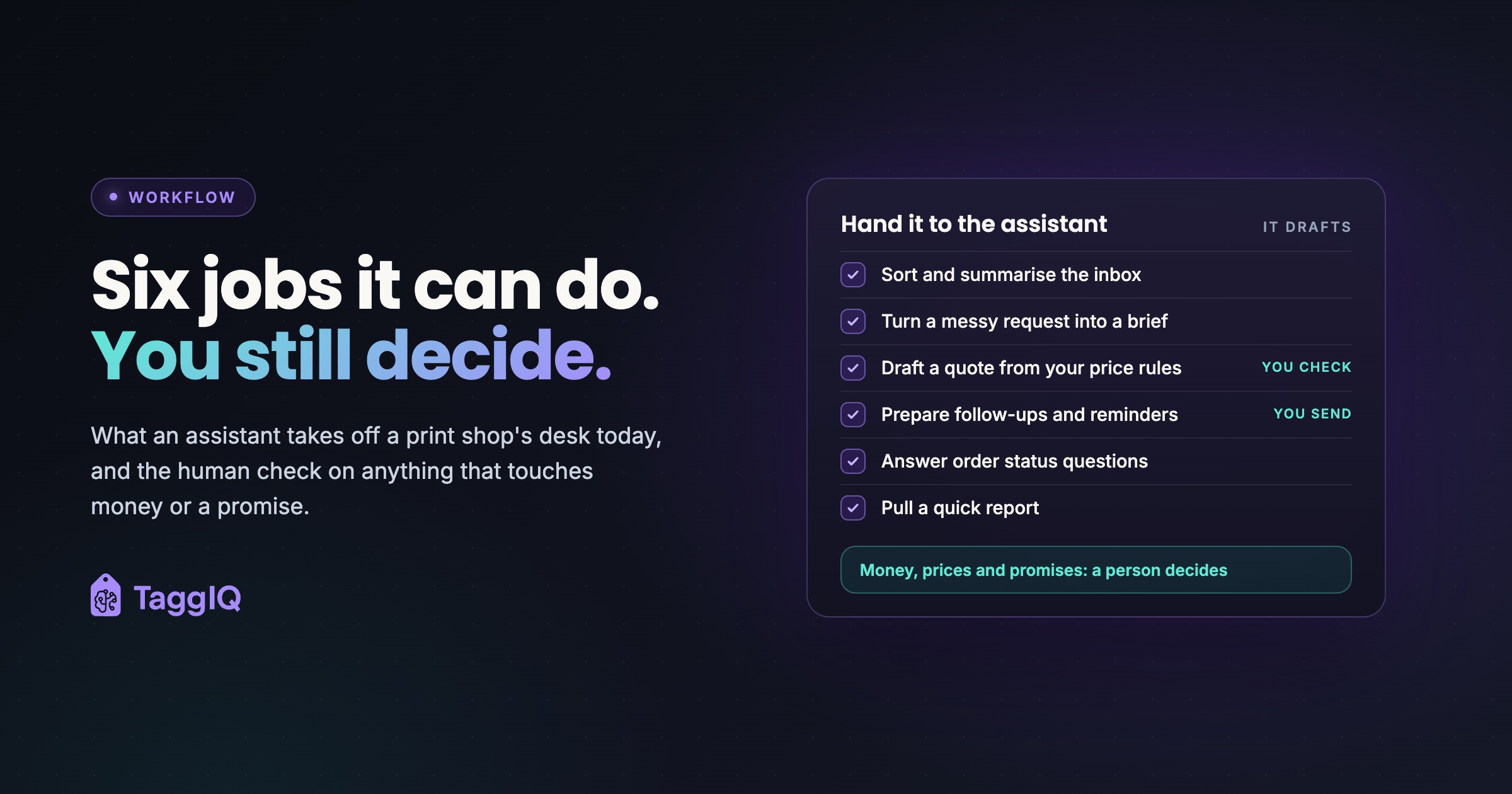
Here is the short answer. A good assistant can do six admin jobs right now: sort and summarize your inbox, turn messy requests into a quote brief, draft a quote from your own pricing rules, prepare follow-ups and payment reminders, answer order status questions and pull quick reports. It drafts. You check anything that goes to a customer, touches money or commits the shop to a price or a date.

First, know which kind of assistant you are using
There are two kinds, and the difference decides what you can trust.
A standalone chat assistant only knows what you paste into it or save in it. Ask it for a quote and it will produce something that looks like a quote, but unless you have given it your price list, it has never seen your prices, your customer history or your order board. Ask about stock or a lead time it cannot look up and it may still answer confidently. NIST’s Generative AI Profile lists this as a risk and calls it confabulation: a fluent answer with nothing real behind it.
A connected assistant can read your business records. The Model Context Protocol (MCP) is described by its project as “an open-source standard for connecting AI applications to external systems.” Through it, AI applications such as Claude or ChatGPT can reach data sources, tools and workflows to get information and carry out tasks.
A connected assistant is less likely to invent your prices or order dates because it can look them up. Less likely is not never. It can still pick the wrong customer record, misread a request or apply the wrong decoration method. That is why every job below has a check.
A shop can start with a standalone tool, and every job below works with one if you copy and paste. Order status is where a live connection matters most, because the answer changes by the hour.
Whichever kind you use, check its data handling before you paste anything in. Customer emails carry names, phone numbers, addresses and sometimes confidential artwork. Read the tool’s terms on how it stores and uses your inputs, or use a business plan whose terms say your inputs are not used to train its models. This is general guidance; check your own privacy obligations.
The six jobs, and the check for each
Triage and summarize the inbox
The assistant reads incoming email and long threads and gives you a short summary: who wants what, by when, and what needs your reply first.
A standalone chat tool cannot open your inbox, so you have three routes: your email client’s built-in assistant, if it has one; a connected tool with mailbox access; or pasting long threads into a chat assistant one at a time. Pasting is slowest but suits the long threads that eat the most time. Delete signatures, email addresses and phone numbers first; the summary does not need them.
Your check: once a day, open two threads in full and compare them with their summaries. Look hardest at dates and quantities, because a deadline buried halfway down a thread is the easiest thing for a summary to drop. If one goes missing, tighten your instructions so every summary lists each date and quantity it finds.
Turn a messy request into a quote brief
Quote requests rarely arrive complete. Ask the assistant to pull out the structured details and list what is missing, so you can send one clarifying email instead of three.
Worked example
A customer writes: “50 polos, left chest embroidery, logo attached, need by the 15th.” The extracted brief reads: polo shirt, quantity 50; embroidery, left chest; logo attached, file type and size not yet checked; deadline the 15th, month not stated. Missing: garment color, size breakdown, whether 50 is the total or per color, delivery or pickup, and whether the 15th is the in-hands date. This request is illustrative.
Copy this instruction
Read the customer request below and return a quote brief with these fields, one per line: product type; quantity, and whether it is the total or per color; size breakdown; garment or substrate color; decoration method; decoration locations; number of colors or approximate logo size; artwork received and file type; deadline, and whether it is an in-hands or ship date; delivery or pickup. Write “missing” for any field the request does not answer. Do not guess. Then turn the missing fields into short questions for a clarifying email.
Paste the request underneath the instruction, with the customer’s name, signature and contact details removed. Describe any attached artwork, such as its file type and size, rather than uploading the file. If your tool lets you save instructions, save this one so everyone on the team gets briefs in the same shape.
Your check: compare the brief to the original email before you reply. The assistant can then draft the clarifying email, which you read before it goes out.
Draft a quote from your own pricing rules
Shops commonly price from a matrix: blank garment or substrate cost, plus decoration cost by method, plus setup or screen charges, with quantity price breaks. A connected assistant can apply those rules to the brief by reading your current pricing and lay out each line.
With a standalone assistant, you can store your price matrix as a saved instruction or project file. Two risks come with that. The file goes stale the moment your blank costs or decoration rates change, and the assistant has no way of knowing. Where the matrix does not cover a case, it fills the gap with a guess that reads just as confidently.
Your check: this is the one to slow down on. If you work from a stored matrix, first confirm its date matches your current price list. Then go down the draft and verify each line:
- The quantity price break matches the quantity quoted.
- Setup, screen or digitizing charges appear once and only once, and only where your rules apply them.
- The decoration method is the one the customer asked for.
- For embroidery, the stitch-count tier matches the logo.
- For screen printing, the color count is right for each print location, including an underbase on dark garments if your pricing charges for one.
- Every extra decoration location is priced.
- Extended-size upcharges are applied where your rules call for them.
- The order meets your minimum, or your small-run charge is included.
- Each line total equals unit price times quantity, and the grand total adds up. Recompute both in a spreadsheet or calculator rather than trusting the assistant’s arithmetic.
A pricing error here goes straight into your margin or your customer’s trust. For what a line-by-line review looks like, walk through this embroidery quote example.
Draft quote follow-ups and payment reminders
Chasing open quotes and overdue invoices is the admin that slips when production gets busy, and both tie up revenue. Give the assistant a list of open quotes or unpaid invoices by age and ask for a prioritized set of reminders in your usual tone.
You do not need a connected tool for this. Export the list from your accounting or shop system as a spreadsheet, delete the columns it does not need, such as contact details and notes, and paste in only the reference, company name, amount and days outstanding.
Your check: read every message before it goes. Make sure the amount and invoice reference are right, and that no customer who has already paid, or who is in a dispute with you, gets a reminder.
Answer order status questions
A connected assistant can read your order stages and supplier records as they change. Without one, you can export your open-jobs list or production board each morning, strip it as you did for reminders and paste it in. That snapshot goes stale within the day: jobs move stage and blank orders slip, and the assistant cannot see either. Ask a tool with no current list and it may invent a date.
Your check: before a date reaches a customer, confirm three things against the job itself: its current production stage, whether the blanks have arrived or are on backorder, and whether you are promising a ship date or an in-hands date. A wrong date costs more goodwill than the minutes saved drafting the reply.
Pull a quick report
Open quotes with no reply, overdue invoices by customer, jobs due this week. A connected assistant can answer questions like these on demand from your own records. Without a connection, export the relevant list, strip the sensitive fields the same way, paste it in and ask your question.
Your check: spot-check a few lines against the source. If the totals look off, ask the assistant what it included and what it left out.
The decision rule: draft, check, then act
| Job | The assistant may | You approve before |
|---|---|---|
| Inbox triage | Summarize and flag | Acting on a flagged item |
| Quote brief | Extract details and list gaps | The clarifying email is sent |
| Quote draft | Draft lines from your rules | Any price reaches a customer |
| Follow-ups and reminders | Prioritize and draft | Each message is sent |
| Order status | Look up and draft a reply | A date is promised |
| Reports | Run and summarize | You make decisions on the numbers |
The rule underneath is simple. An assistant can work alone on anything internal and read-only. Anything that goes to a customer, touches money or commits the shop to a price or date stays a draft until a person approves it.
What to keep off the list for now
Some jobs sound tempting but carry more risk than they save for a small shop:
- Judging artwork for print. Keep your own preflight for resolution, size, color count and file format, and keep proof approval with the customer. The artwork approvals guide covers why that step matters.
- Pasting unredacted emails or confidential artwork. Strip contact details first, as described above, and keep to tools whose data terms you have checked.
- Letting it send to customers directly. Wrong tone, a promise you cannot keep or a wrong delivery date all cost more than drafting time.
Measure it, or you will never know
A pilot without a measure either quietly becomes a habit or gets dropped, with no evidence either way. Count the check time honestly, or the numbers will flatter the tool.
Worked example
Say a shop handles 30 quote requests a week at about 10 minutes of admin each to read, clarify and draft. That is 300 minutes, or 5 hours a week. With an assistant producing the brief and draft, suppose each request takes 4 minutes to prompt and review, plus 2 minutes for the price check. That is 6 minutes each, or 180 minutes a week. The net saving is 120 minutes, about 2 hours. If the check keeps turning up corrections, review time rises and the saving shrinks. These figures are illustrative; time your own week before and after.
Keep a simple log while you test, one line per output: the job, the minutes it took, any correction you made and the type of error. The sample rows below are illustrative.
| Job | Correction | Error type |
|---|---|---|
| Quote brief | Added missing size breakdown | Missed detail |
| Quote draft | Wrong price break applied | Pricing rule |
| Payment reminder | None | None |
| Inbox summary | Deadline left out | Missed detail |
At the end of the week, the error type column tells you what to fix. Repeated pricing-rule errors point at your stored matrix or instructions; repeated missed details point at the instruction you gave.
Try one job this week
- Pick one job. Choose the one with the clearest right answer. Inbox summaries or quote briefs are easy to check against the original email.
- Write down the check. Decide what you will confirm on every output, using the checks above.
- Time a normal week first. Note roughly how long the job takes per request today, so you have something to compare against.
- Run it for a week. Use the assistant on every instance of that job and log each correction, however small.
- Decide on evidence. Keep it, change the instructions or drop it. If it earns its place, add the next job from the list.
Where a connected assistant fits in TaggIQ
TaggIQ’s AI Co-Worker connects through MCP and supports Claude Desktop, Claude.ai and Claude Code; other MCP-compatible clients may work, depending on how well they support MCP. It reads and writes your TaggIQ records, so it can look up customers, search connected supplier catalogs, draft quotes with customer history, pricing tiers and setup and per-unit costs from your own decoration rules, report order status, run reports from your records, and list overdue invoices with reminders that wait for your send approval.
The guardrails follow the same rule as above. The AI cannot create payments or credit notes or change tax fields, and external actions need approval through a single-use signed URL. For how this sits alongside the other tools a shop runs, see where one AI agent fits.
See the AI Co-Worker See what the AI Co-Worker can look up, draft and hold for your approval.
Frequently asked questions
Can a shop start with a free chat tool instead of a connected one?
Yes, for jobs where everything it needs is in what you paste: summarizing a thread, extracting a quote brief or rewording a follow-up. Do not ask it about prices, order status or stock unless you have pasted in current figures, because otherwise it has nothing to look up and will guess. Check its data handling terms before pasting in customer details.
What should you do when the assistant gets a price wrong?
Fix the rule, not just the draft. A wrong price usually traces back to a missing or ambiguous instruction, such as a setup charge that only applies to certain jobs or a price break that starts at a different quantity than the assistant assumed. Correct the instruction or the pricing record, then rerun the draft.

Emma
Emma writes for TaggIQ about practical AI and automation for print, promo, sign and embroidery businesses: AI assistants and agents, quoting and follow-up workflows, customer experience and keeping people in charge of the decisions that matter.