In this article 12 sections
Your phone goes before the first press is warm. Someone needs a price checked, a customer wants to know where their hoodies are, and three invoices from last month still haven’t been chased because chasing is your job. Every job in the building passes across your desk at least once, so the shop moves exactly as fast as you do.
The short answer: AI can take a real share of that load, but not the part most people expect. It is good at preparing things: drafting a quote, lining up payment reminders, summarising where every order stands. It cannot decide anything you have never decided out loud. The shops that get the owner out of the middle do it in two steps. First they write the rules down, then they let AI do the drafting for those rules.
This article gives you a task audit to sort your week into three columns, a set of rule templates to fill in, and a way to keep a human approval step on anything that reaches a customer or the books.

Why AI alone does not remove the bottleneck
It is tempting to picture an assistant that “just handles it”. The problem is that most of what you approve all day is judgement you have never written anywhere. You know that a 50-piece embroidered polo order for a regular client can go out at a slightly thinner margin than a one-off job, but that knowledge lives in your head.
AI cannot apply a margin floor that does not exist. Staff can’t either, which is why delegated tasks keep coming back to you. If you hand someone “do the quotes” without a threshold, every quote that feels slightly unusual returns to your desk, and you are back where you started with an extra step in the middle.
So the order matters:
- Decide the rule.
- Write it where staff can see it.
- Let AI prepare the work that follows the rule.
- Keep a person approving anything that leaves the building.
You are not alone in being unsure where AI fits. In the UK government’s AI Adoption Research, the most cited barrier among businesses was “no identified need for AI” (71%), followed by limited AI skills or knowledge (60%) (DSIT, AI Adoption Research). The audit below is designed to answer that first barrier for your own shop: it shows you exactly where a need exists and where it does not.
The three-column owner task audit
Take one normal week. List every task where someone had to come to you, or where you did something only you do. Then put each task in one of three columns.
| Column | What it means | Test to apply |
|---|---|---|
| AI prepares | A draft or summary can be produced from your records, then a person checks and sends it | Is the output a document, message or list that follows a pattern? |
| Rule decides | A written threshold lets a staff member make the call without asking | Could you write the decision as “if X, then Y” in one line? |
| Owner keeps | Needs your judgement, relationships or authority | Would a wrong call cost a key account, a large sum or your reputation? |
Some tasks split across columns, as quote pricing does in the example below.
Worked example
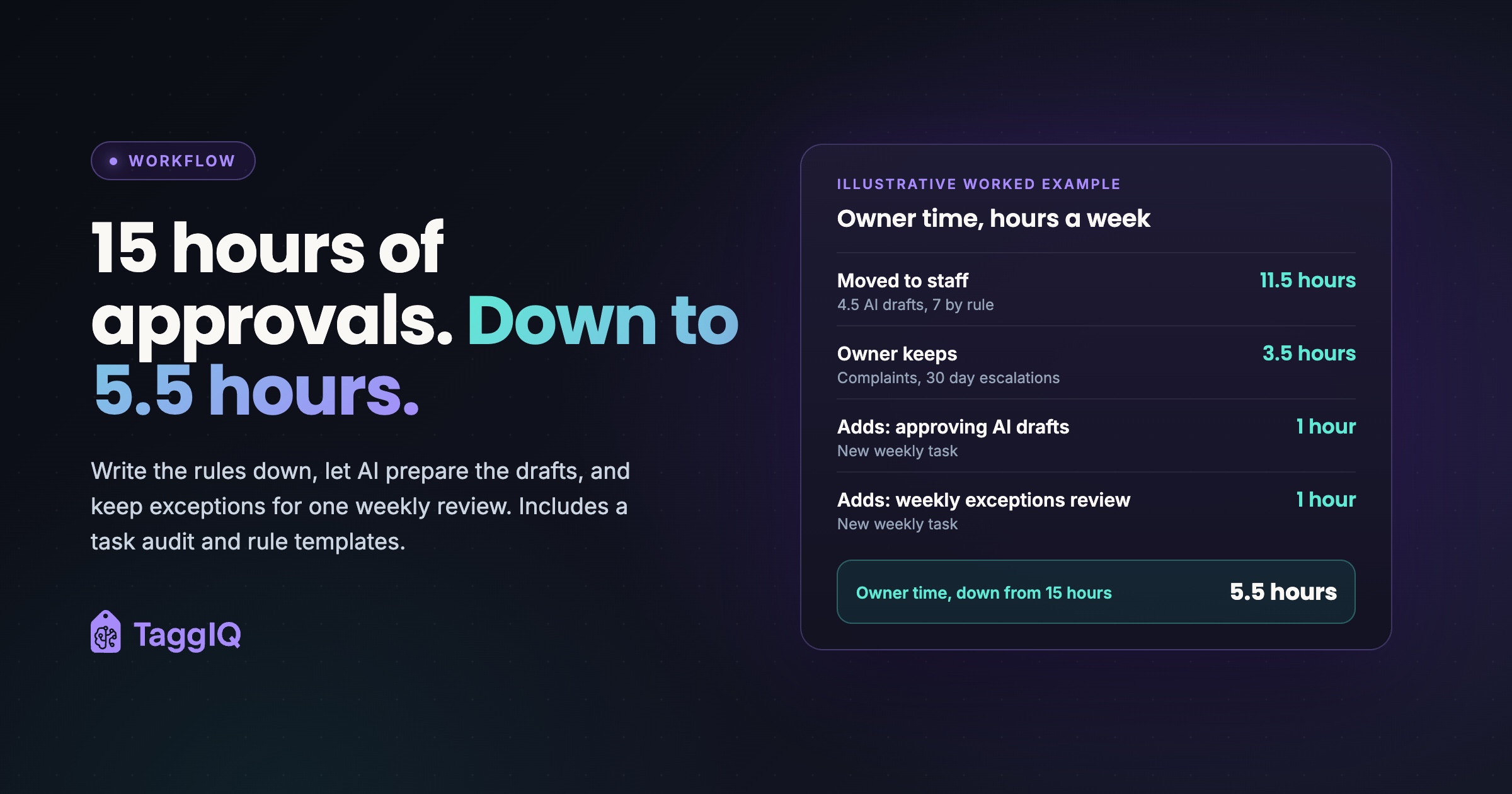
These figures are illustrative. An owner of a mixed embroidery and print shop logs about 15 hours a week on approvals, questions and chasing, then sorts each task (hours per week, shown as AI prepares / rule decides / owner keeps):
- Quote pricing, 4 hours: 2 AI drafts / 1 at or above the floor / 1 below the floor.
- Artwork approval chasing, 2.5 hours: 0 / 2.5 / 0.
- Production scheduling questions, 2 hours: 0 / 2 / 0.
- Overdue invoice chasing, 2 hours: 1.5 for 7 and 14 day reminders / 0 / 0.5 for 30 day escalations.
- Supplier stock checks, 1.5 hours: 0 / 1.5 / 0.
- Reorder reminders to customers, 1 hour: 1 / 0 / 0.
- Customer complaints, 2 hours: 0 / 0 / 2.
- Total, 15 hours: 4.5 / 7 / 3.5.
Staff take on 11.5 hours (4.5 checking AI drafts plus 7 working from rules). The owner keeps 3.5 hours of tasks and adds 2 new ones: approving AI-prepared drafts (1 hour) and a weekly exceptions review (1 hour). Owner time falls to 5.5 hours, freeing 9.5. It does not drop to zero, and it should not.
Your own numbers will differ. Logging them shows which tasks are routine enough to move.
Rule templates you can fill in this week
Each rule below turns one of your recurring approvals into a decision staff can make. Fill in the brackets with your own figures. If you are not sure where your bottleneck sits, finding the bottleneck in your print shop workflow walks through how to trace it.
Margin floor for quotes
“Any quote at or above [X]% margin can be sent by staff. Anything below [X]%, any order over £[Y], and any new customer asking for credit terms comes to the owner.”
Set the floor from your actual job history, not a round number you like the sound of.
Artwork sign-off
“Staff send the proof. If no approval arrives within [2] working days, staff send one reminder. If there is still no approval at [4] working days, the production slot is released and the customer is told the new date.”
The rule takes you out of chasing and protects the schedule from jobs that are stuck waiting.
Scheduling
“Standard turnaround is [10] working days from approved artwork and confirmed sizes. Staff can promise any date at or beyond that. Anything shorter is a rush job and comes to the owner, or follows the rush pricing sheet.”
Credit control
“Send an invoice reminder at [7] days overdue and again at [14] days. At [30] days, the account goes to the owner, and no new work starts until it is discussed.”
Reorders and stock
“Staff can check supplier stock and confirm availability for any product already on the customer’s last order. Substitutions of a different garment or colour go to the customer for approval, not to the owner.”
Do not treat every job as an exception
If half your jobs end up flagged for owner review, the rules are too tight or too vague. Loosen the threshold or split the rule until most routine jobs pass without you. Otherwise the bottleneck stays exactly where it was.
Where AI fits once the rules exist
With rules written down, AI has something to work from. The pattern to use is simple: AI prepares, a person approves, then it is sent. The useful jobs for AI in the audit tend to be:
- Drafting quotes from your pricing and decoration rules, for staff to check against the margin floor.
- Preparing payment reminders for invoices that hit the 7 and 14 day points in your credit rule.
- Summarising production status so “where is my order” questions get answered without walking the floor.
- Answering record questions such as which products made the best margin last month.
- Drafting follow-up replies in your tone for staff to edit.
What AI should never do is send to customers on its own, or touch payments and the books without guardrails. An automated message that goes out wrong can damage a relationship that took years to build. What you should never let AI decide in your print shop covers those lines in more detail.
What this looks like in TaggIQ today
TaggIQ’s AI Co-Worker connects to Claude Desktop, Claude.ai and Claude Code over MCP (a standard way for an AI assistant to use your business tools). It can look up customers, search connected supplier catalogues, draft quotes for approval and list overdue invoices. It prioritises overdue follow-ups and prepares reminders that wait for you to approve sending, reports production status across connected orders, and suggests decoration pricing based on your own decoration rules.
As TaggIQ’s AI features page sets out, nothing goes to customers, suppliers or the books without explicit confirmation, money is read-only for the AI, external actions need a single-use approval link that expires in 24 hours, and every tool call is audit-logged. MCP integration is included on every plan and the 14-day trial.
A set of dedicated agents, covering quote follow-up, margin checks, artwork chasing and scheduling, is on the roadmap but not yet available.
What stays yours
Clearing routine approvals is not about leaving. It frees time for the work only an owner can do:
- Pricing strategy and when to raise prices.
- Key accounts and the conversations that grow them.
- Complaints, where tone and judgement matter more than speed.
- Credit decisions on accounts that hit the 30 day point.
- Reviewing and adjusting the rules themselves.
Replace job-by-job approval with one weekly exceptions review. Look at every quote that fell below the floor, every artwork job that slipped, every account escalated for payment. If the same exception keeps appearing, that is a sign to write or change a rule.
Written rules also make holidays and illness less risky. When the decisions are on paper, the shop keeps quoting, scheduling and collecting cash at a margin you set, even when your office is empty.
Your next step
This week, log every interruption for five working days. Sort each one into the three columns. Write the margin floor and credit control rules first, because they protect the most money. Only then decide which drafting jobs to hand to AI.
See the agent roadmap See which TaggIQ agents are planned next and what each one is designed to take off your desk.
Frequently asked questions
Will my staff actually use written rules, or keep asking me anyway?
They keep asking when a rule leaves room for doubt. Make each rule a single "if X, then Y" line with a number in it, and when someone does come to you, answer by pointing to the rule or by changing it, not by making a one-off decision.
Should I start with AI or with rules?
Start with rules. AI drafting is only useful when there is a threshold to check the draft against. Without one, every AI draft becomes another thing you have to approve.
Is it safe to let AI see my invoices and customer records?
Look for tools where money is read-only for the AI, nothing is sent without your confirmation and every action is logged. Check that before connecting anything to your accounts or customer data.
How often should I review the rules?
Use the weekly exceptions review as your trigger. If the same kind of job is flagged week after week, rewrite the rule that keeps catching it.

Emma
Emma writes for TaggIQ about practical AI and automation for print, promo, sign and embroidery businesses: AI assistants and agents, quoting and follow-up workflows, customer experience and keeping people in charge of the decisions that matter.