In this article 8 sections
A charity organiser has emailed you. The message mentions hoodies, a rough quantity, a colour, a date and a budget, and there is a blurry logo attached. You keep hearing that AI can turn an email like this into a quote in seconds, and before you trust that with your margin you want to know where the limits are.
The short answer: AI can copy customer-supplied details into quote fields, but each value must be checked against the email. The limit is everything it would have to guess, such as colour count or decoration method, and those guesses are exactly the fields that move the price. Before sending, put a number on what each guess could cost you, validate the expensive ones, and keep pricing with a person.
Below, one illustrative brief is used to price a single guess and to build a validation routine for inferred fields. This is a walkthrough, not a test or benchmark of any tool. For the wider intake workflow, from enquiry email to specification and clarifying questions, see where AI fits in intake.
The example brief: a charity hoodie enquiry
Worked example: the brief
“We need about 120 hoodies for our charity fun run in navy with our logo on the front and the event name on the back, need them by 14 March, budget around £2,500.” Attached: a low-resolution PNG of the logo. This brief, and every figure in this article’s worked examples, is illustrative. None of it comes from a measured test.
On a first read it looks complete: product, quantity, colour, positions, date and budget are all there. That is exactly why it is risky. A brief that looks complete invites a draft that looks complete, and a fluent draft is easy to mistake for a checked one.
Stated fields versus guessed fields
Six things in this brief are stated: hoodies, about 120, navy, logo front and event name back, 14 March, and around £2,500. A tool can quote each one word for word, and you can check it against the email in seconds. Three things the price depends on are not stated at all: decoration method, the number of print colours and the print sizes. Any value a draft gives for those is inference.
Extraction and inference are different jobs. Pulling “navy” and “14 March” out of an email is extraction: the answer is sitting in the customer’s words, so any mistake shows up the moment you compare the draft with the source. Working out from a blurry PNG that the logo is three colours, or deciding that “logo on the front” means a large centre-chest print, is inference. There is no source line to check against, and that is where errors hide.
Even extraction is not error-free. Anthropic’s guide to reducing hallucinations says language models “can sometimes generate text that is factually incorrect or inconsistent with the given context.” OpenSanctions, which uses AI to extract data from documents, has published the failures it found: details “cleaned too much”, placeholder entries created despite instructions not to, a missed alias, and values the source never mentioned. Its answer was to have people review all AI-extracted data side by side with the source before accepting it.
In a print shop that looks like a draft quietly assuming one-colour print, left-chest placement or a standard size split, all written in the same confident tone as the fields the customer actually supplied.
What one unflagged guess does to the job
Worked example: the guess that came in under budget
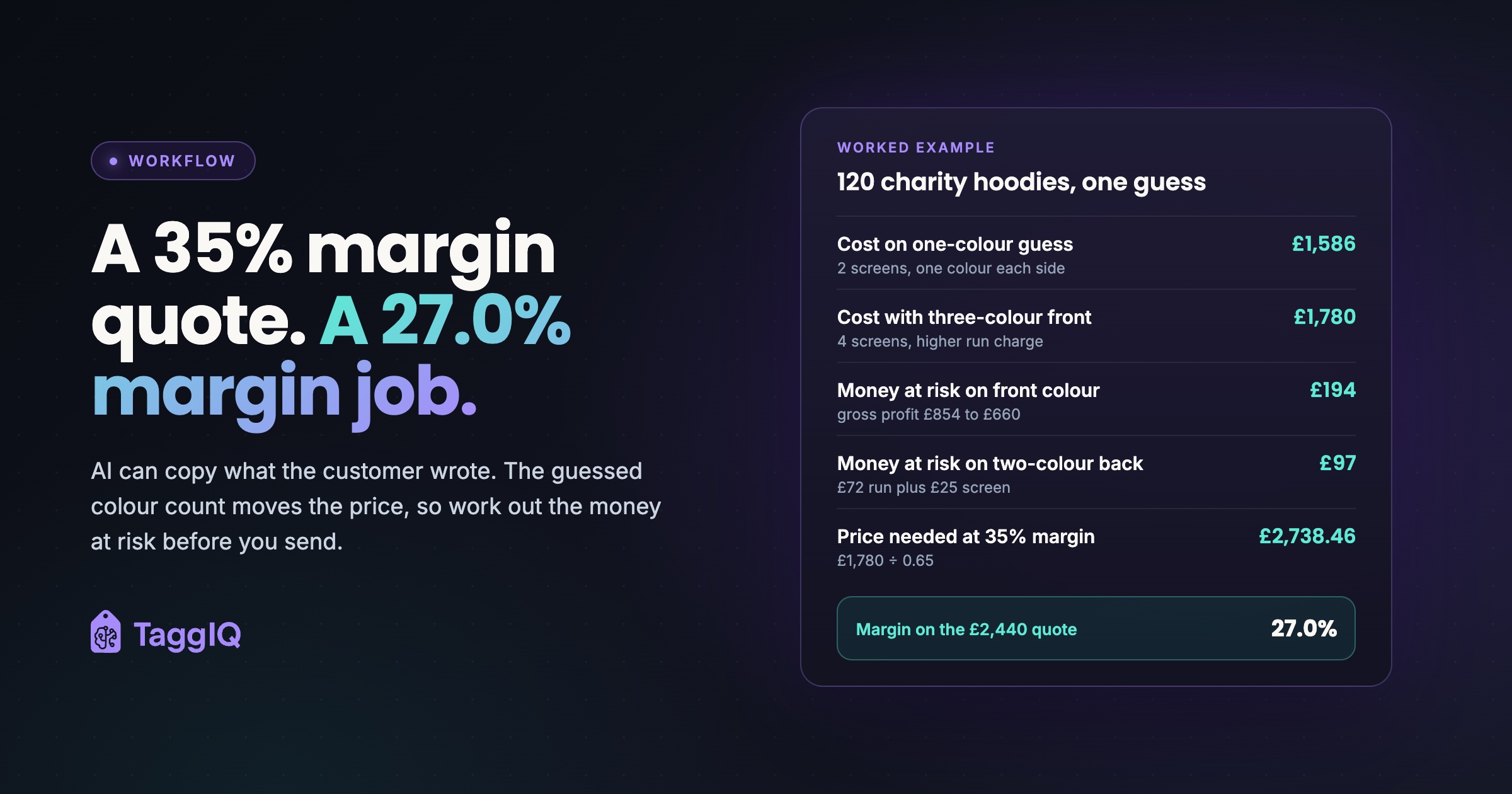
Say the tool assumed a one-colour print on the front and a one-colour print on the back. Illustrative costs: blank hoodie £11.00 at the 100+ break, screen setup £25 per screen, run charge £0.90 per unit for one colour and £0.60 for each extra colour, per position.
Cost on the guess: blanks 120 × £11.00 = £1,320. Run charges 120 × (£0.90 + £0.90) = £216. Setup 2 screens × £25 = £50. Total £1,586. At a 35% gross margin target the price is £1,586 ÷ 0.65 = £2,440 before VAT and delivery. That is under the customer’s £2,500, assuming their budget excludes VAT, so it looks like a winner.
When the vector file arrives, the logo turns out to be three colours. Run charges become 120 × (£2.10 + £0.90) = £360. Setup becomes 4 screens × £25 = £100. Total cost £1,780. At the quoted £2,440 your margin falls to £660 ÷ £2,440 = 27.0%. The price you should have quoted at 35% was £1,780 ÷ 0.65 = £2,738.46, about £2,740 before VAT and delivery, and that is above the budget.
On navy, also check whether the three-colour print needs a white underbase, a base layer printed first so the colours show on dark fabric. If it does, that is another screen and run charge, and the true price moves further over budget.
Once the error is found you have two options: absorb the lost margin, or re-quote and look careless. Notice too that the guessed price landed under budget, which makes it more likely to be accepted. A wrong guess and a fast “yes” go together. Setup and run charges are where small decoration errors grow, as decoration pricing and its hidden margins explains.
Put a price on each guess before you send
The fix is a short calculation for every inferred field. Work out the cost under the tool’s guess and under the most expensive outcome you think is plausible. The gap is the money at risk. If it is more than you are willing to absorb on this job, confirm the field before a firm price goes out.
Worked example: the money at risk
Using the figures above, cost under the one-colour guess is £1,586 and cost under a three-colour front is £1,780. The money at risk on the front colour count is £194, the drop in gross profit from £854 to £660.
Say your house rule is to absorb up to £50 of uncertainty on a job this size. £194 is well above that, so the colour count is confirmed from vector artwork before a firm quote goes out.
Run the same test on the back print. If the event name could arrive as a two-colour design, the extra colour adds 120 × £0.60 = £72 in run charges plus £25 for another screen: £97 at risk, also above the threshold, so it becomes a question for the customer too.
A guessed field with little money at risk can go on the draft as a written assumption. A guessed field with a lot at risk is a question for the customer, asked before you commit to a number.
How to validate each inferred field
Each guess has its own check. None of them needs the AI to be cleverer; they need the right source.
| Inferred field | What a draft might assume | How to validate it | What a wrong guess changes |
|---|---|---|---|
| Print colour count | One colour per position | Count colours from vector artwork, or ask for it | Screens and run charge per colour |
| Underbase on dark garments | None | Check the design against the garment colour | An extra screen and run charge per position |
| Print size and placement | A standard front print | Agree width and position in writing | Setup, and possibly the method |
| Decoration method | Screen print | Your estimator chooses once colours and quantity are known | The whole cost structure |
| Firm quantity | 120 | Ask whether “about 120” is final | Which blank price break applies |
| Deadline fit | Date recorded, not checked | Work back through approval, stock arrival and production | Rush charge or a different date |
The quantity row is easy to miss. “About 120” may end up as 95 once sizes are collected, which drops the order below a 100+ blank price break. Confirm the final number before the price is fixed, not after.
Checking the tool’s own output
Anthropic recommends a few basic steps to reduce made-up output: let the model say “I don’t know”, ground its answers in direct quotes from the source, and check each claim against a quote, removing any claim that has none. It also suggests telling the model to use only the documents provided rather than its general knowledge.
Two quick tests follow from that. First, any field a draft marks as stated must come with the customer’s words; if there is no quote, treat it as inferred and price its risk. Second, run the same brief twice and compare the inferred fields, especially the colour count. Anthropic notes that differences between runs can point to made-up output. If the colour count changes between runs, the tool is guessing.
Treat all of this as reducing guesswork, not removing it. A sensible house rule is simple: any figure that affects the price is checked by a person before it leaves the shop, and blank costs, setup, run charges and margin come from your own price lists, never from AI text.
Quote, estimate or indicative price
The word at the top of the document matters. Sending a document labelled “quote” while the colour count is still a guess sets up an awkward conversation if the artwork changes the price. Where the money at risk is still above your threshold, send an indicative price with its assumptions written out and the questions attached, and issue the firm quote when the artwork and sizes arrive.
Write the assumptions on your quote template, give it a validity period, and say what would change the price, so the customer can see what the figure rests on if the final artwork or size split differs from the brief. This is general guidance, not legal advice, so check your own terms of business and obligations.
What to do this week
Take three briefs you quoted last month. For each field the customer did not actually state, work out the money at risk between the value you assumed and the most expensive plausible outcome. Any field that went over your threshold without being confirmed is the field to make a standing question at intake, and the field no AI draft should fill without a flag.
Once the inputs are clean, the pricing itself should follow fixed rules. The automated print quote example works through one embroidery job line by line.
Get the quote template Use the quote template to write the assumptions behind each price on the document.

Emma
Emma writes for TaggIQ about practical AI and automation for print, promo, sign and embroidery businesses: AI assistants and agents, quoting and follow-up workflows, customer experience and keeping people in charge of the decisions that matter.