In this article 13 sections
- Why a 12-piece job can look fine and still lose money
- The minimum order quantity formula
- How to set your target job profit
- What counts as setup for each method
- Worked example: the same small order, three ways
- Screen print: 12 shirts, two colors, one location
- DTF: the same 12 shirts
- Embroidery: 12 left-chest polos, new logo versus repeat logo
- Choosing how to handle orders below the minimum
- The cost that never shows on the quote: the queue
- Promo items: check the supplier's minimum first
- Rules that stop the haggling
- Your next step this week
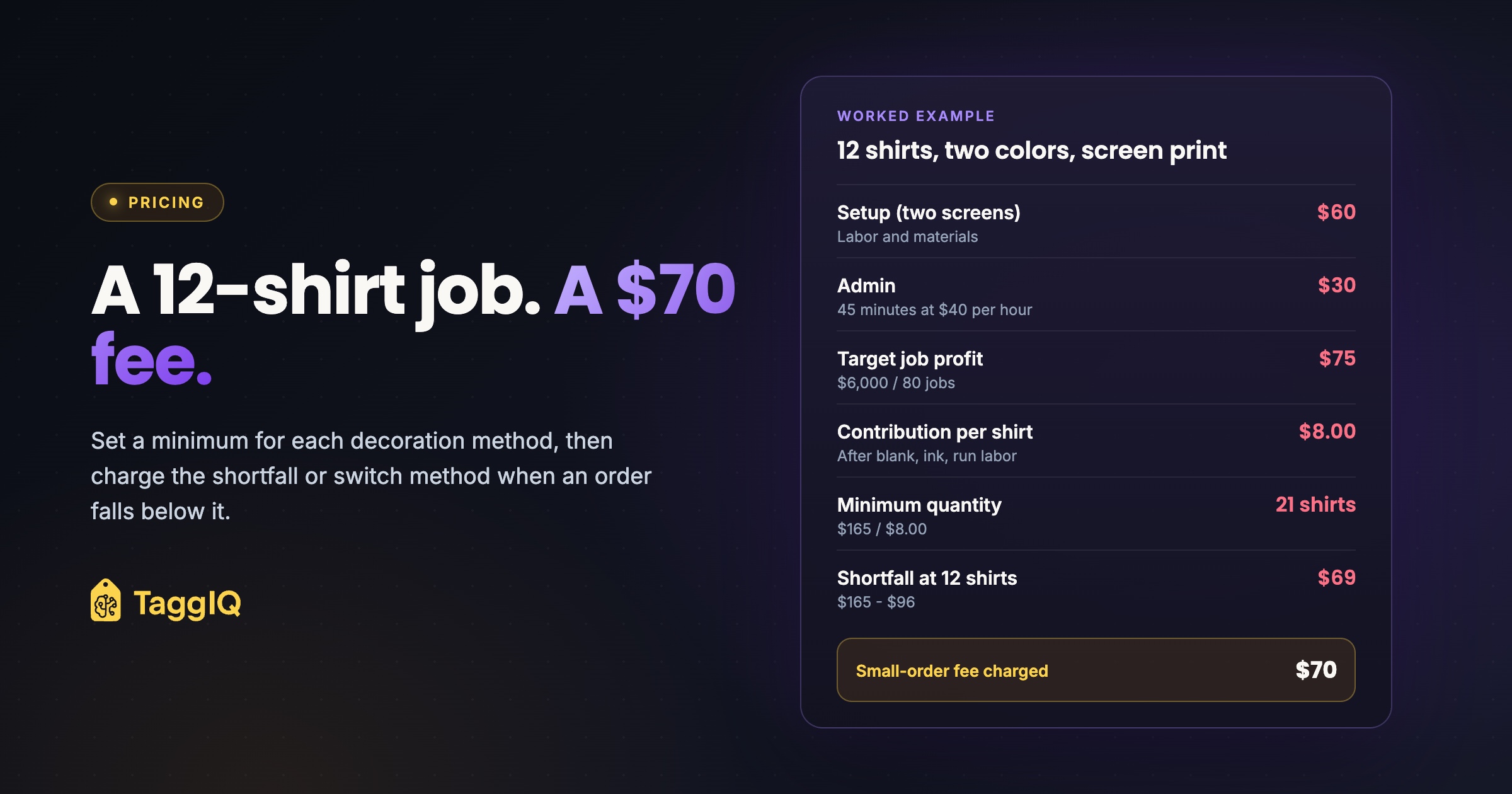
A customer wants 12 shirts with two colors on the front, by next Friday. Your press is booked with three large orders. You also know the small job will take nearly as long to quote, proof and set up as any of them. You can say no, take it at your usual price and hope, or work out a number that makes it worth doing.
The short answer: work out a minimum for each decoration method from your own setup time, your admin time and the least profit you will accept on any job. When an order falls below that minimum, don’t refuse it on reflex. Charge a small-order fee that covers the shortfall, or offer a method with less setup.
Why a 12-piece job can look fine and still lose money
Every job has two kinds of cost. Some grow with quantity: blanks, ink or thread, and run time. Others are fixed for each job. These are setup (screens, digitizing, press prep) and admin (quoting, artwork revisions, proof approval, ordering blanks, invoicing and chasing payment).
A per-piece price built for a longer run spreads those fixed costs thin. At 200 pieces, an hour of setup and admin adds very little to each shirt. At 12 pieces, the same hour can eat the whole margin. The per-piece figures on the quote still look healthy, so the loss is easy to miss.
Press time is easy to see. The ten emails about which blue the customer meant are not.
The minimum order quantity formula
One formula works for every decoration method:
Minimum quantity = (setup cost + admin cost + target job profit) / contribution per piece
- Setup cost: the one-time labor and materials to get the job ready to run, such as screens and emulsion, digitizing, test prints or sew-outs, and cleanup.
- Admin cost: the time spent on the order outside production, multiplied by a fully loaded labor rate (wages plus payroll taxes and benefits).
- Target job profit: your floor. This is the least a job must contribute toward rent, equipment, software and profit before it earns a slot. The next section shows how to work it out.
- Contribution per piece: the selling price per piece minus the blank, consumables and run labor for that piece.
Two checks keep the math honest. First, keep overhead such as rent or equipment payments out of setup and admin. The target job profit is there to cover overhead, so counting it in both places pushes the minimum too high. Second, if your per-piece price already recovers some setup, either take that out of the price or leave setup out of the formula. Never count it twice.
When a customer orders below the minimum, the same numbers give you the fee:
Small-order fee = (setup + admin + target job profit) - (contribution per piece x quantity ordered)
How to set your target job profit
The target decides the formula, so don’t pick it by feel or copy it from anyone else. Work it out from what the business has to cover each month, then share that out across the jobs you actually run.
Worked example: deriving the target
Monthly overhead (rent, utilities, equipment payments, software, insurance, and any salaried time not already counted as job labor): $5,000. Monthly profit goal: $1,000. Together the business needs $6,000 a month from its jobs.
Jobs completed in a typical month: 80. Target job profit: $6,000 / 80 = $75 per job.
If press time is your real constraint, a rate per press hour is an alternative. The same $6,000 spread over 150 booked press hours is $40 per press hour, so a job that holds the press for 1.5 hours needs $60. Pick one method and use it consistently.
Now see how much the target moves the answer. In the screen-print example below, a $75 target gives a minimum of 21 shirts. Drop it to $50 and the minimum is 18. Raise it to $100 and the minimum is 24. Adding 15 minutes of admin, by contrast, moves the minimum by only about one shirt. Get the target right first.
What counts as setup for each method
Setup cost varies a lot from one method to another, so one minimum for the whole shop will be wrong for most of your work. In screen printing, each color needs its own screen, so more colors mean more screens and more cost. One US decorator sets its screen-printing minimum at 12 shirts and gives setup time and materials as the reason. The same company recommends direct-to-garment printing for orders under 12, because it has no minimum, no setup fees and no extra charge for more colors.
The lesson to take from that is the pattern, not the number: set a separate minimum for each method.
| Method | Fixed per job | Grows with quantity | Effect of a repeat order |
|---|---|---|---|
| Screen print | One screen per color per location, burning, registration, test prints, cleanup | Blanks, ink, run time | Kept screens cut setup sharply |
| Embroidery | Digitizing a new design, hoop and machine setup, thread changes, test sew-out | Blanks, thread, backing, stitch time | An existing stitch file removes digitizing |
| DTF or heat transfer | Gang-sheet layout, press warm-up | Blanks, transfers, press time per piece | Little change, because setup is already small |
Worked example: the same small order, three ways
Worked example: shared assumptions
Fully loaded labor rate: $40 per hour. Admin time per order: 45 minutes, which costs $30. Target job profit: $75, from the overhead calculation above. These figures are illustrative. Replace them with your own.
Screen print: 12 shirts, two colors, one location
Worked example: screen print
Setup: two screens at 30 minutes each is 60 minutes, which costs $40 in labor. Add $10 of screen, emulsion and ink-waste materials per screen ($20 in total) and setup comes to $60. Add $30 of admin and the $75 target, and the job has to bring in $165.
Contribution per shirt: a $13.00 selling price, minus a $4.00 blank, $0.40 of ink and supplies, and $0.60 of run labor, leaves $8.00.
Minimum quantity: $165 / $8.00 = 20.6, so 21 shirts. Leave out the target and true break-even is $90 / $8.00 = 11.25, so 12 shirts: a 12-piece minimum only covers its own costs and adds almost nothing toward overhead.
At 12 shirts, contribution is $96, so the shortfall is $165 - $96 = $69, rounded up to a $70 fee. Without a fee, the job brings in $156 against $150 of cost ($48 blanks, $4.80 ink, $7.20 run labor, $60 setup, $30 admin). That leaves $6 toward overhead and profit. With the $70 fee, the job brings in $226 and leaves $76.
The fee gets smaller as the order grows: $37 at 16 shirts, $5 at 20, and nothing at 21. One US decorator describes a typical setup fee as $20 per color, per print location. That would bring in $40 on this job. It covers two thirds of this illustrative setup and none of the admin.
DTF: the same 12 shirts
Worked example: DTF
Setup: 15 minutes of gang-sheet layout and press warm-up costs $10. With $30 of admin and the $75 target, the job has to bring in $115.
Contribution per shirt: a $15.00 selling price, minus a $4.00 blank, a $2.50 transfer and $1.00 of press labor, leaves $7.50.
Minimum quantity: $115 / $7.50 = 15.3, so 16 shirts.
At 12 shirts, contribution is $90, so the fee is $25. The customer pays $205 in total, compared with $226 for screen print, and the job meets the $75 target.
Embroidery: 12 left-chest polos, new logo versus repeat logo
Worked example: embroidery
New logo: $30 to digitize, plus 15 minutes of hoop setup, thread changes and a test sew-out ($10), plus $30 of admin and the $75 target. The job has to bring in $145.
Contribution per polo: a $22.00 selling price, minus a $9.00 blank, $0.50 of thread and backing, and $4.00 of run labor (6 minutes, including hooping), leaves $8.50.
Minimum quantity: $145 / $8.50 = 17.1, so 18 polos. At 12 polos, contribution is $102, so the fee is $43.
Repeat logo: there is no digitizing, so the job has to bring in $115. Minimum quantity: $115 / $8.50 = 13.5, so 14 polos. At 12 polos, the shortfall is only $13. If repeat orders also need less admin because there is no new proof, the gap gets close to zero.
If you already bill digitizing as its own line, take it out of the formula, because the customer is paying for it directly.
Choosing how to handle orders below the minimum
A fee is only one option. Pick the one that suits your capacity and your customers.
| Option | How it works | Best when |
|---|---|---|
| Hard minimum | Decline below the minimum quantity | Press time is scarce and small jobs push out large ones |
| Small-order fee | A flat fee equal to the shortfall, rounded | You want to keep small customers without subsidizing them |
| Separate setup line | Setup shown per color and location, or digitizing shown on its own | Repeat work is common and buyers should see why reorders cost less |
| Low-quantity price bracket | A higher per-piece price for short runs | Customers dislike fees and you quote from a price grid |
| Minimum order value | A dollar floor across the whole order | Mixed orders that use several methods |
| Route to digital | Offer DTF or DTG for short runs | The design works well with a digital method |
If you use price brackets, work out the shortfall at the bottom of each bracket. A single uplift spread across a wide range will overcharge at the top of it.
The cost that never shows on the quote: the queue
The formula covers money. It does not cover the press slot. In the screen-print example, setup is an hour of labor. Coating and burning screens happens in the screen room, off the press, but registration, test prints and cleanup still hold the press before the first shirt and after the last. That press time could have gone to a larger job.
If one machine is always booked solid, you have three ways to account for that:
- Raise the target job profit for that machine only.
- Fit small jobs into known gaps, such as the end of a shift.
- Batch small jobs that share ink colors so they share cleanup.
Promo items: check the supplier’s minimum first
For distributors, check the supplier’s terms before you quote. Ask whether the item can be ordered below its minimum at all, and what the charge is if it can. Then put that charge on the quote as its own line. If you miss it, the charge comes straight out of your margin.
Rules that stop the haggling
A minimum only works if you apply it the same way every time.
- Set a minimum for each method, and for screen print, base it on color and location count.
- Write down when you waive the minimum or fee, for example on a repeat order that uses kept screens or an existing stitch file.
- Apply the rule to every customer.
- Recalculate when your labor rate or setup times change.
- Offer an alternative whenever you state the minimum: a digital method, a fee, or combining with a later order.
Your next step this week
Pull your five smallest jobs from last month. For each one, estimate the real setup time and admin time, then run the formula for that decoration method. You will have a working minimum and fee for each method before your next small inquiry arrives.
Check your job margins Run a small job's setup charges and labor through the profit margin calculator before you send the quote.
Frequently asked questions
Should I just use the 12-piece minimum other shops use?
Only if your own numbers support it. Run the formula with your own labor rate and times, and set your minimum from that result.
How do I explain a small-order fee without losing the customer?
Show it as its own line and give the reason in one sentence: setup and order handling cost about the same whether you print 12 pieces or 200. Offer the alternatives in the same message, such as adding pieces to reach the minimum or switching to a digital method.
What if a small customer promises a big reorder?
Charge the fee now and make the reorder cheaper by keeping the screens or stitch file and dropping setup next time. You could also credit the fee against a reorder placed within a set period. Either way, the first job still pays its way and the promise of more work is still rewarded.
Should the fee apply per order or per location?
Split it. Admin is a cost per order, so that part of the shortfall belongs to the whole order. Screen-print setup is a cost per color and per location, so a second print location adds its own setup to the formula and raises the minimum for that design.

Dave
Dave writes for TaggIQ about running a profitable print, promo, sign and embroidery business: costing and estimating, margins, production flow, order workflows, pricing decisions and keeping customers coming back.