In this article 11 sections
- Why the brief decides the shortlist
- The promotional product presentation brief template
- Let AI search, and widen before you narrow
- The curation checklist
- Green claims and safety need evidence, not adjectives
- Pricing each card by hand
- From 18 candidates to six options
- What the time saving is worth
- What goes on each card
- Sharing the presentation by link
- Try the brief on your next presentation
A client wants options for a batch of conference gifts by Friday, and you already know how the afternoon goes. You open a wall of browser tabs and find supplier sites that disagree on stock. You copy images into a deck and work out pricing in a spreadsheet beside it. Nobody pays for that time.
The short answer for a promotional product presentation is to let AI do the searching and keep the judgement for yourself. Write the brief so a machine can act on it and ask an AI search for a wide shortlist. Then cut that list by hand, confirming each product in supplier data and checking stock, decoration fit, full landed cost, green claims and safety. Price every card yourself.
Why the brief decides the shortlist
An AI search can only be as specific as what you type. Ask for “something nice for a conference” and you get the same pens, tote bags and bottles you would have found yourself.
A good brief turns the client’s words into limits a search can filter on: a number, a date, a price ceiling, a colour count, a material.
The promotional product presentation brief template
Fill this in from the client conversation before you search. Agree the budget first so the shortlist starts out realistic.
| Field | What to write | Why it matters to the search |
|---|---|---|
| Purpose | The event, campaign or use, in one line | Separates a keepsake from a giveaway |
| Audience | Who receives it | Rules items in or out (children, outdoor, office) |
| Quantity | Main quantity plus one break above it | Brings the right supplier price tiers into play |
| In-hands date | The date the goods must arrive | Filters out long lead times |
| Budget | All-in per unit, ex VAT, including decoration and delivery | Stops headline prices that will not survive costing |
| Logo | Colour count, brand colour references, level of detail, minimum legible size | Rules out small print areas and colour mismatches |
| Decoration | Preferred or excluded methods | Matches the method to the material |
| Materials and policies | What “lower impact” or the client’s sourcing rules actually mean | Turns a vague preference into something you can search on |
| Exclusions | Products, colours or categories to avoid | Stops you presenting what they rejected last time |
The table leaves out the client’s name, contact details and anything confidential about the campaign, because the search does not need them. When you use a general-purpose AI tool, describe the need and leave all of that out. Check what your client contract says about confidentiality, and your own data-protection obligations.
Worked example: a filled brief
Purpose: delegate gift for a UK industry conference. Audience: 250 adult delegates, office-based. Quantity: 250, with a price at 500. In-hands: four weeks from today. Budget: up to £8 per unit all-in, ex VAT. Logo: one colour, wordmark only, legible down to 40 mm wide. Decoration: print or engrave, no embroidery. Materials: the client requires recycled or recyclable materials and wants any claim backed by supplier evidence. Exclusions: no single-use plastics, and no pens because they gave pens last year.
Let AI search, and widen before you narrow
Before you search, work back from the client’s all-in budget to a supplier cost ceiling. Then turn the brief into one or two plain-English requests, and ask for more candidates than you will present, spread across your price bands.
Worked example: from budget to search request
An £8 all-in budget at a 35% target margin leaves £5.20 for landed cost. Allow £0.90 per unit for decoration, setup and delivery at 250 units, and the supplier cost ceiling is £4.30. The three all-in bands to fill are up to £5, £5 to £6.50 and £6.50 to £8. The request becomes: “Find notebooks, desk items and drinkware under £4.30 a unit at 250, in recycled or recyclable materials, with a one-colour print area at least 40 mm wide.”
Before you filter on that ceiling, check that the catalogue or feed price is your net trade cost, not a list price.
Know which kind of AI search you are running, because it changes what you check. A search connected to your supplier catalogues works from their data, which you still confirm is current. A general chatbot given a supplier price list you upload is only as current as that file. Check the supplier’s trade terms before you upload it. A general chatbot used to brainstorm categories has no link to supplier feeds. In those last two cases, confirm every product, code and price in the supplier’s own data before it goes on a card.
If you use TaggIQ, the AI Co-Worker, a supported AI assistant you connect to your TaggIQ account, searches your connected supplier catalogues from a plain-English request. The same confidentiality check applies to what you type into it and what the connected assistant can see. The catalogue also filters by category, colour, stock and price range where the supplier’s data supports it. Confirm materials and print areas in supplier data.

The curation checklist
Go through every candidate and record why you reject each one you drop.
| Check | Reject if | Note to record |
|---|---|---|
| Exists as described | Product code, price or print area cannot be confirmed on the supplier’s site or feed | Not found in supplier data |
| Live stock | Stock for your quantity is not confirmed with the supplier or feed today | Stock below quantity on the day |
| Lead time | Production, delivery and artwork approval leave no buffer before the in-hands date | Misses the date once proof time is added |
| Decoration fit | Print area, colour count or material does not suit the logo | Print area smaller than the logo minimum |
| Landed cost and margin | The all-in price at your margin floor is above the budget band | Over budget at the margin floor |
| Green claims | The brief requires a green attribute and the supplier cannot evidence it (otherwise drop the claim and keep the product) | Required attribute not evidenced |
| Product safety | The recipient or use raises a safety question the supplier has not documented | No documentation for food contact |
| Distinctness | It duplicates a better option you have already kept | Duplicate of a kept item |
Then write one line for each product you keep, explaining why it fits this brief. “Holds the agenda insert and stays on the delegate’s desk” gives the client a reason to pick it. Supplier copy pasted word for word makes your deck read like every other distributor’s. For the decisions to keep human, see what you should never let AI decide.
Green claims and safety need evidence, not adjectives
The CMA’s Green Claims Code is aimed at all businesses that make environmental claims, and it also applies, to a more limited extent, to businesses marketing to other businesses. It warns that terms like “green”, “sustainable” or “eco-friendly”, especially when used without explanation, are likely to suggest a positive or at least no adverse environmental impact. Its principles include that claims must be truthful, clear and substantiated, and must consider the full life cycle of the product. In practice, replace the adjective with a specific fact the supplier can evidence, such as a recycled-content percentage on a certificate. If there is no such fact, drop the claim. Treat this as general guidance and check how the Code applies to your claims.
On safety, OPSS guidance says distributors must not sell products they know, or should have known, are unsafe. They must keep records of their suppliers so products can be traced, and they have a duty to report unsafe products. Before an item goes on a card, ask the supplier for a declaration of compliance if it touches food, or safety test reports if it is for children. This is general guidance only, so check your own obligations with Trading Standards or a qualified adviser.
Pricing each card by hand
Build each card’s price at the main quantity and one break above, from supplier cost, decoration, setup spread over the quantity, and delivery, then apply your margin. Decoration charges are where a competitive headline price can quietly turn thin, so cost them every time. The example below applies one margin for simplicity. If you mark up setup and run charges separately, the card still shows one all-in unit price.
Worked example: pricing the A5 notebook
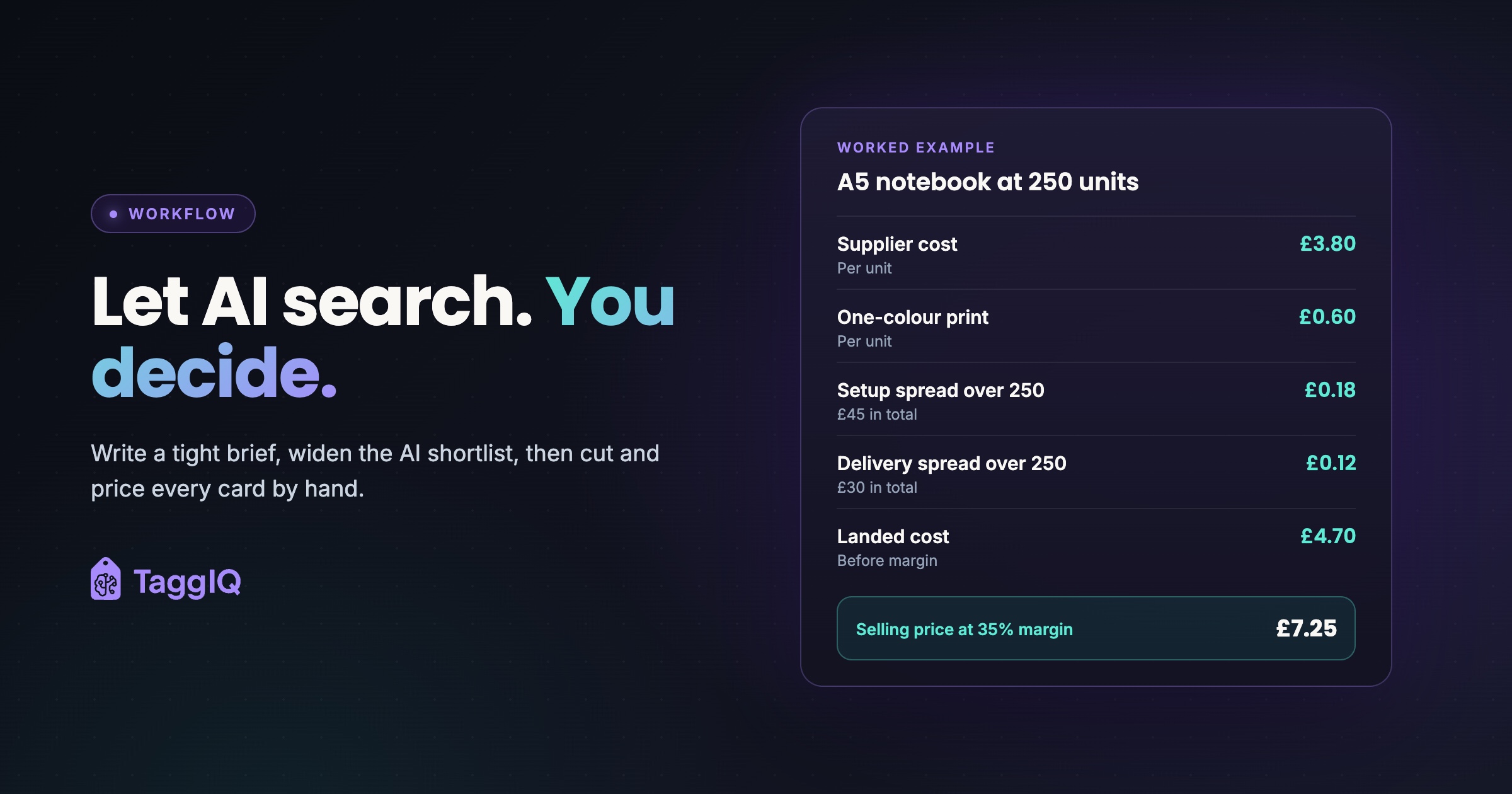
At 250 units: supplier cost £3.80, one-colour print £0.60, setup £45 spread over 250 is £0.18, delivery £30 spread over 250 is £0.12. Landed cost is £4.70. At a 35% target margin the selling price is £4.70 divided by 0.65, which is £7.23, rounded to £7.25. Margin check: £2.55 on £7.25 is 35.2%.
At 500 units: supplier cost £3.50, print £0.55, setup £45 over 500 is £0.09, delivery £40 over 500 is £0.08. Landed cost is £4.22, giving a selling price of £6.49, rounded to £6.50.
All figures are illustrative and ex VAT. A 35% margin on the selling price is a markup of about 54% on cost, so if your system applies a markup percentage, enter the markup, not the margin.
Keep your own time out of the per-unit price. Presentation hours are overhead that your margin covers across all your jobs, not a line on this quote.
In TaggIQ you can add a catalogue product to an open quote in one click, bringing in its details, pricing tiers and images, applying your markup percentage and layering decoration pricing on top.
From 18 candidates to six options
Worked example: the curation pass
The AI search returned 18 candidates. Three failed on stock or lead time against the four-week date. Two had print areas too small for the 40 mm wordmark. Three came in above £8 all-in at a 35% margin, because engraving or delivering heavier items cost more than the £0.90 allowance. Two could not evidence the recycled or recyclable materials the brief required. One was a drinks bottle with no food-contact documentation supplied in time. One duplicated a better notebook already kept. That makes 12 rejections, each with a reason, leaving six.
The six went into the three bands, two in each, at 250 units. The notebook at £7.25 sits in the top band.
Three bands, or good, better and best, give the client a real choice without a long scroll.
What the time saving is worth
Worked example: hours recovered
A manual build takes about three hours of searching, checking stock, copying images, pricing and formatting. The AI-assisted build takes about one hour, including the curation pass and pricing checks. That assumes a presentation tool or template that pulls in product details and images. At five presentations a week that is ten hours back. At £25 an hour of rep time, that is £250 a week of capacity.
That figure is capacity, not cash, because your wage bill does not fall. It only pays off if those hours go into quoting more briefs or following up the ones you have sent.
What goes on each card
Give every card the same fields in the same order.
| Element | What to show |
|---|---|
| Image | Product photo, or a virtual mock-up with the client’s logo in position |
| Decoration | Method, print position and print area size |
| Colours | Product colours available at your quantity |
| Price | All-in unit price, ex VAT, at the main quantity and one break above |
| Lead time | Working days from artwork approval to delivery |
| Minimum order | The minimum quantity at the price shown |
| Validity | A “prices valid until” date |
| Stock | “Subject to stock at time of order” |
| Rationale | Your one line on why it fits this brief |
The validity date and stock line protect you if feed prices or stock move between presenting and ordering. Recheck both before you confirm the order.
Where a supplier offers a virtual-sample tool, use it for the first mock-up. If you use a general AI image tool instead, check its terms on uploaded artwork and whether your client contract allows it before you upload the client’s logo. Then check the mock-up yourself: the logo at true size inside the real print area, colours the method can reproduce, and nothing across a seam, handle or curve.
Sharing the presentation by link
Send a link the client can comment on and approve, and keep a PDF for clients who prefer one. In TaggIQ, presentations carry your logo and colours and show the products, pricing tiers and decoration details. They are shared by link with no customer login, and clients can approve and comment from any device. The promotional products page shows how this fits into a distributor’s wider workflow.
Try the brief on your next presentation
Use the brief template this week, even if you do the search by hand. Time the build, record your rejection reasons and compare the result with your usual method. To try the AI search step, paste the search request from your brief into your connected AI Co-Worker if you use TaggIQ, or into your usual AI search, and confirm every result in supplier data.
See the catalogue search Search connected supplier catalogues, compare tier pricing and add products to a quote from one place.
Frequently asked questions
Should prices on the cards include decoration and setup?
Yes. Fold decoration, setup and delivery into one all-in unit price at each quantity, ex VAT, and say what is included. A low unit price with extras listed underneath invites a second round of quoting after the client has chosen.
The client just says they want "eco-friendly". What do I search for?
Ask what they mean before you search. It might be recycled content, recyclable at end of life, fewer materials, or reusable instead of single-use. Each one is a different filter and needs different evidence from the supplier.
Can AI write the product descriptions?
It can draft them and tidy supplier copy to a consistent length. Write the rationale line yourself, and remove any claim about materials, safety or performance that you cannot match to supplier data.

Emma
Emma writes for TaggIQ about practical AI and automation for print, promo, sign and embroidery businesses: AI assistants and agents, quoting and follow-up workflows, customer experience and keeping people in charge of the decisions that matter.