In this article 16 sections
- What research says about website chatbots
- Sort your enquiries by shape
- A decision rule: chat or form?
- Where chat hurts
- The unanswered bubble (live chat, hybrid)
- The pop-up that gets in the way (any set-up)
- Leads nobody can reply to (any set-up)
- Promises you can't keep (AI bot, hybrid)
- Too many doors (any set-up)
- The handoff checklist
- When to hand over to a person
- What the handoff record must contain
- Where the record lands
- Honest opening and out-of-hours messages
- Privacy and accessibility checks before you switch it on
- What to do this week
You’ve seen the little website chatbot or live chat bubble on other suppliers’ sites, and someone has told you it will turn browsers into buyers. You’d also be the one answering it, possibly with one hand on a heat press. The question is whether chat helps your visitors or just gives them one more thing to close.
The short answer: chat helps when visitors ask short questions you can answer with a yes, a no or a date, and when someone is actually there to reply. When an enquiry needs quantities, sizes, a decoration method, a deadline and artwork before you can price it, a well-built quote form does the job better. Either way, the handoff matters more than the widget: every conversation should reach a person and land in one lead list.
Three set-ups get called chat. Live chat is a person on your team typing replies. An AI bot answers alone from facts you have written down. A hybrid bot answers those facts and hands the rest to a person. The research below studied AI bots, not live chat; the staffing advice applies to live chat and to the person behind a hybrid.
What research says about website chatbots
The most useful recent evidence comes from Nielsen Norman Group (NN/g), a usability research firm. In a 2026 study of eight site AI chatbots, run as moderated sessions with nine participants, they found that users rarely used site chatbots, often did not notice them, and struggled to see what a bot offered beyond search, filters or general-purpose AI tools. Their summary is blunt: “Users will not experiment to discover a chatbot’s value.” (NN/g, March 2026)
It’s a small qualitative study, not a market survey. Bots were most valuable when they acted as experts, giving information or reasoning the rest of the site did not provide. NN/g recommends adding a chatbot only to solve problems your existing pages cannot, ideally in one specific area, and showing it in context rather than as a generic floating icon.
That gives a print shop a simple test. If the answer a visitor wants could sit on a page, put it on the page first. Chat only earns its place where a quick, informed conversation does something a page cannot.
Sort your enquiries by shape
Website enquiries to a print, sign or embroidery shop come in two broad shapes: questions that need an answer, and requests that need a price.
| Enquiry shape | Example | What a good answer needs | Better channel |
|---|---|---|---|
| Capability question | “Can you embroider on softshell jackets?” | A yes or no | FAQ page, or chat if staffed |
| Fixed-fact question | “What’s your minimum for printed tees?” | A number you already know | Product page or FAQ |
| Timing question | “Could you do 50 polos by next Friday?” | A person checking the schedule | Chat with a person, then a quote |
| Apparel quote | “How much for hoodies for our team?” | Product, quantity, sizes, decoration, deadline, postcode, artwork | Structured quote form |
| Sign quote | “Price for a shop fascia?” | Dimensions, material, location, installation details, artwork | Structured form, then a call or visit |
You can’t price a quote request without the details in the last two rows, so a form that asks for them up front, using the fields your quote template needs, does more work than an open chat box. The timing row is the awkward one. “Can you do it by Friday?” sounds like a quick question, but the honest answer depends on your production schedule and the state of the artwork. It needs a person, never a bot alone.
Worked example
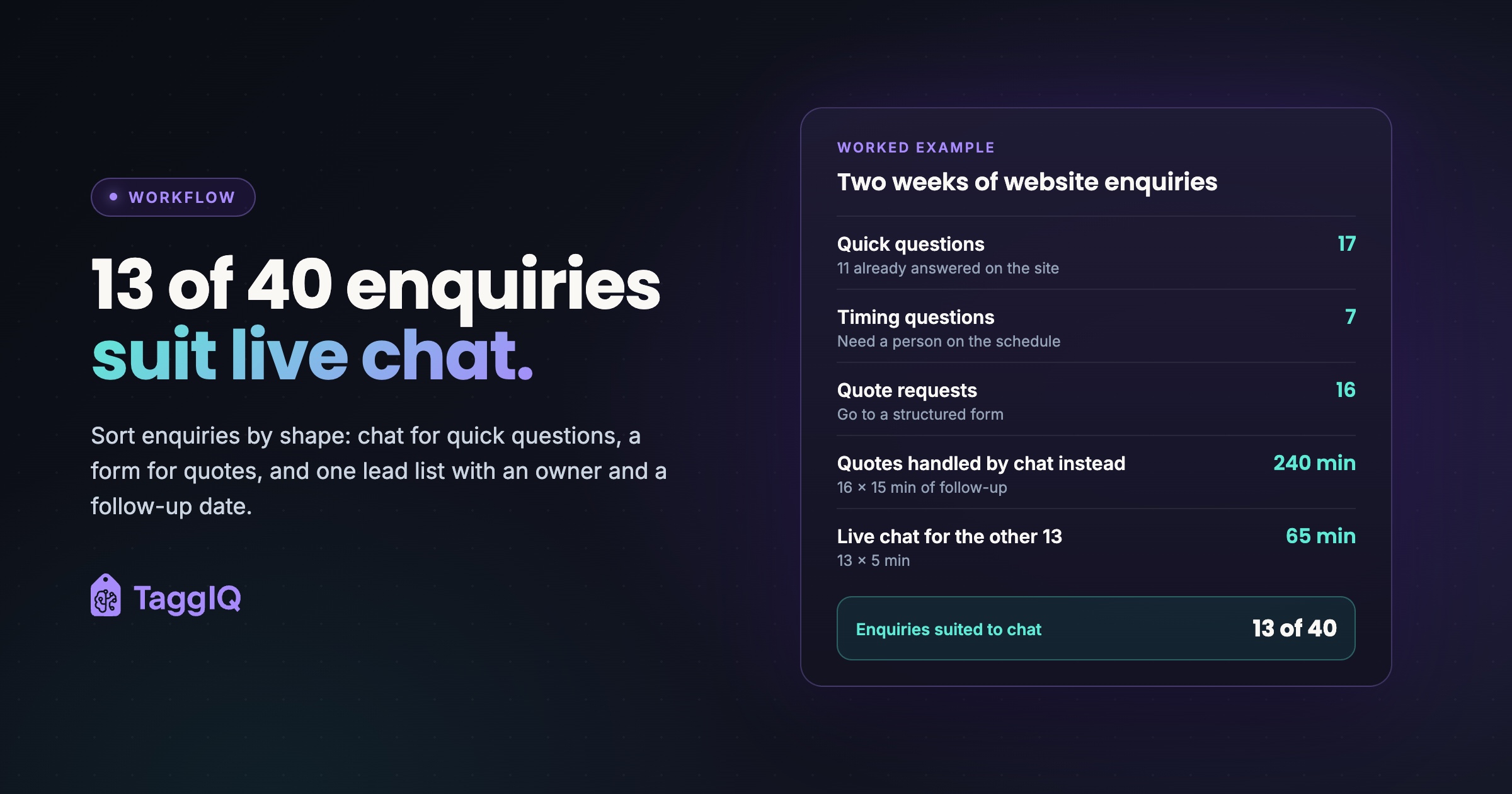
A three-person embroidery and print shop: the owner runs production, one person handles the office and one runs the presses. For two weeks the office manager tags each website enquiry as it arrives. There are 40 in total: 17 quick capability or fixed-fact questions, 7 timing questions and 16 quote requests (17 + 7 + 16 = 40).
Of the 17 quick questions, 11 already had answers somewhere on the site, just not where visitors looked. Those answers move onto the relevant product pages and an FAQ. That leaves 6 quick questions and 7 timing questions, 13 in the fortnight, that a person on chat could have handled well. The 16 quote requests go to a structured form.
Sending those quote requests through chat instead would be costly. If each arrived as a first name and “how much for some hoodies?” and needed three five-minute follow-up emails to collect the specs, that is 16 × 15 = 240 minutes, four hours of office time a fortnight before a single quote is priced: £60 at £15 an hour.
Against that, live chat for the other 13 means one or two chats a working day. At about five minutes each, 13 × 5 = 65 minutes a fortnight, roughly £16 at the same rate. The real cost is having someone at a screen during the stated hours, and only the office manager works at a desk.
Verdict: with 13 of 40 enquiries suited to chat and a desk-based person to answer them, this shop runs live chat on its decoration and turnaround pages only, staffed by the office manager from 10:00 to 12:00 and 14:00 to 16:00, with the quote form for anything priced.
A decision rule: chat or form?
A heuristic, not research
Test one: after moving fixed answers onto your pages, are at least one in five website enquiries quick capability or timing questions? If not, lead with a structured form and skip chat.
Test two: can a named person who already works at a desk reply within your stated window during set hours each working day? If yes, live chat or a hybrid can help on the pages where those questions come up. If no, use a form with a stated reply time, plus clear FAQ and product pages.
When to consider a bot: consider an AI bot for written fixed facts only when those facts are too many or too scattered to show well on pages, such as a long matrix of garments, decoration methods and file rules, because then the bot does a job your pages can’t.
The one-in-five line is illustrative, not a benchmark.
Where chat hurts
The unanswered bubble (live chat, hybrid)
If live chat is on while the only person who can answer it is running the presses, a visitor left waiting twenty minutes learns something about your responsiveness while comparing suppliers. Set staffed hours, show an offline state outside them, and switch the widget to a “leave a message” form.
The pop-up that gets in the way (any set-up)
If your chat tool lets you choose between a proactive pop-up that opens by itself and a passive launcher that waits to be clicked, start with the passive launcher. A proactive window that opens within seconds on every page can cover a phone screen.
Leads nobody can reply to (any set-up)
A chat that ends with a first name and no email or phone number leaves you nobody to reply to. Ask for contact details before the conversation closes, and send anything that needs a price to the quote form.
Promises you can’t keep (AI bot, hybrid)
An AI bot without clear limits can state a price, lead time or capability the shop can’t honour, and that becomes a dispute later. Give it fixed facts to answer from, plus one rule: any price, deadline or “yes, we can do that” on a custom job goes to a person, which is the bot-versus-person line set out in where AI fits in intake.
Too many doors (any set-up)
A chat bubble, a messaging-app button and a callback widget competing on the same page confuse the visitor. Pick one primary written channel per page. NN/g recommends a single chat entry point, with one bot that clearly identifies itself, handles what it can and hands over to a human when it can’t (NN/g guidelines).
The handoff checklist
On handoffs, NN/g is direct: “AI chatbots should allow users to connect with human agents with minimal friction”, and “Never gatekeep when the user explicitly asks to be connected to a human.” It says users do not yet see AI chatbots as equivalent to human agents. Handing over too quickly can raise labour costs, but refusing to hand over is “far worse” (NN/g, July 2026).
When to hand over to a person
- The visitor asks for a person. Hand over straight away, without making them answer qualifying questions first.
- The visitor rephrases the same question. NN/g treats repeated rephrasing as a sign of frustration that should prompt an offer to escalate.
- The conversation gets to a price, a deadline or a commitment on a custom job.
- The visitor wants to send artwork or describe a job with several variables.
What the handoff record must contain
Every chat record needs the first and last rows. The rows in between are job details: note any the customer has already given, and let the quote form collect the rest after handover.
| Field | Why it matters |
|---|---|
| Name, plus email or phone | Someone can reply after the chat closes |
| Product type | Garment, sign, banner or promo item |
| Quantity, with sizes or dimensions | Drives price and stock checks |
| Decoration method | Print, embroidery, transfer or vinyl changes the cost and the schedule |
| Deadline as a date | “Soon” cannot be scheduled |
| Delivery location or postcode | Affects carriage and timing |
| Artwork status | Exists or not, which format, uploaded or to follow |
| Full transcript | Keeps the context the customer has already given |
Where the record lands
The transcript has to leave the chat tool’s inbox. Every chat, form, email, phone call and trade show contact should go into one lead list, each with a named owner and a follow-up date. The lead follow-up workflow map sets out what happens after that.
Honest opening and out-of-hours messages
NN/g’s transparency guidance covers telling visitors the bot is AI, what it can and can’t do, and how it handles their data. The opening below is for an AI or hybrid bot; for staffed live chat, the first line should name the person and the staffed hours instead.
Template messages
Opening message: “This is an automated assistant. It can answer questions about what we decorate, minimum orders, file formats and typical turnaround. It cannot give prices or confirm deadlines, but the team can, from 10:00 to 12:00 and 14:00 to 16:00, Monday to Friday.” Suggested questions: “Do you embroider on caps?”, “What file should I send?”, “Talk to a person”.
Out-of-hours message: “Thanks for getting in touch. The team is offline right now. Leave your name, email and a short note and we will reply by 11:00 on the next working day. For a price, our quote form asks for everything we need in one go.”
Privacy and accessibility checks before you switch it on
Chat collects names and contact details, so check that your privacy notice covers it before the widget goes live. Ask your chat provider whether the widget loads scripts or stores anything on visitors’ devices, not only whether it sets cookies, and check how it works with your cookie banner.
This is general guidance, not legal advice. Check your own data protection and cookie obligations, or ask an adviser, before collecting personal data through a new tool.
For accessibility, WCAG 2.2 Success Criterion 2.4.11 requires that a component with keyboard focus is not entirely hidden by content the site author added. W3C names persistent chat windows, sticky footers and cookie banners as content that can cause failures (W3C). To test, with your browser window narrowed to phone width and the widget showing, use the Tab key to move through your quote form, file upload and any basket or checkout, and check that nothing important ends up behind it.
What to do this week
Tag your next 30 or 40 website enquiries by shape. Move every fixed answer onto the page where visitors look for it. Then apply the decision rule. If chat makes the cut, write the opening and out-of-hours messages before you install anything. After a month, count the chats answered within your published window and the chats that became quotes. If those numbers don’t hold up, cut the hours or switch chat off.
The step that pays off whichever way you go is every enquiry in one list, with an owner and a follow-up date. TaggIQ doesn’t offer website chat, but its leads pipeline brings website enquiries, trade show contacts and referrals into one place, with reminders before follow-ups and alerts when they’re overdue. The Lead Agent page covers outbound prospecting, not website enquiries: an example workflow, scoped after a demo, that isn’t available today.
See the leads pipeline Bring every enquiry into one pipeline with follow-up reminders, overdue alerts and a clear path to the first quote.
Frequently asked questions
Is a 24/7 AI chatbot worth it if nobody can staff chat?
Only if it answers fixed facts you've written down and is honest about what it can't do. Out of hours it should say it is automated, collect a name and an email, and tell the visitor when a person will reply. If it can't do those three things well, an offline message pointing to your quote form does the same job with less risk.
Can customers send artwork through chat?
Test it before you promise it. Send a real vector file and a large print-ready PDF through the widget yourself, then check what arrives at your end. If files come through compressed or get rejected, point customers to the upload on your quote form instead, so you aren't chasing the same file twice.
How quickly do we need to answer a chat?
Set your own reply window, publish it in the widget, and keep a note of how often you hit it over a fortnight. If you keep missing it, shorten the staffed hours rather than leaving visitors waiting.

Emma
Emma writes for TaggIQ about practical AI and automation for print, promo, sign and embroidery businesses: AI assistants and agents, quoting and follow-up workflows, customer experience and keeping people in charge of the decisions that matter.