In this article 12 sections
- Why the first hour is worth designing for
- The lead follow-up automation workflow map
- Step 1: Capture every enquiry in one place
- Step 2: Write an acknowledgement that does real work
- Step 3: One owner, one backup, two alarms
- Step 4: Sort leads into three bands
- Step 5: Follow-ups with an end point
- Out of hours and Monday mornings
- What stays human
- What one recovered enquiry is worth
- A short weekly pipeline check
- Setting it up this week
An enquiry for event hoodies comes in through the website mid-morning. The person who usually answers is on the heat press, the shared inbox is full of supplier notices, and by the time anyone replies later in the week the buyer has approved a proof somewhere else. Nobody chose to ignore the lead. It just wasn’t anyone’s job yet.
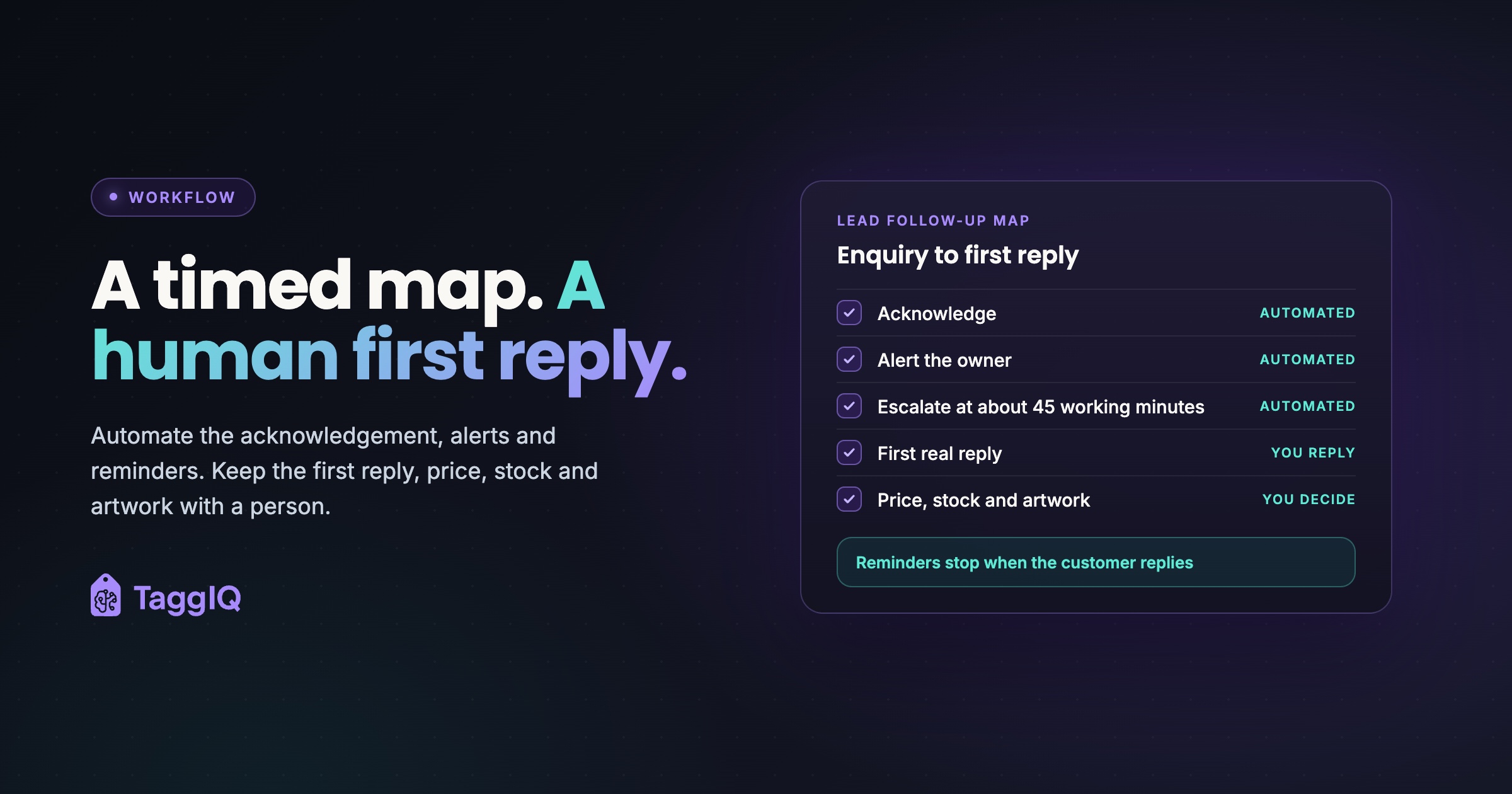
The fix is a short, timed workflow, not a bigger system. Automation acknowledges instantly and asks for the quote brief, alerts the owner, escalates to a backup and reminds you to follow up. A person makes the first real reply within the first working hour and keeps every decision on price, stock and artwork. This lead follow-up automation map covers the window from enquiry to that first reply, before any quote is sent.
Why the first hour is worth designing for
Many precise speed-to-lead statistics circulate online, but few trace back to a study anyone can open, so none are repeated here. One widely cited study, The Short Life of Online Sales Leads in Harvard Business Review (March 2011), opens by saying that most companies are not responding to online leads nearly fast enough.
In a print or sign shop the commercial case is plain:
- You have already paid for the enquiry. Advertising, the website, trade shows and referrals all cost money. A slow reply wastes that spend.
- Buyers shop around. People buying signs, print or branded apparel often contact several suppliers. In practice, the first useful reply tends to set the terms of the conversation.
- Many jobs have a date attached. Events, launches, team kits and school terms don’t move. A slow reply can lose the job outright.
- A good first reply saves staff time. Asking for the brief up front cuts out back-and-forth and gets the quote out sooner.
The lead follow-up automation workflow map
Each stage is marked as automated or human. The automation keeps time. The people have the conversation.
| Stage | Trigger | Who does it | What happens |
|---|---|---|---|
| Capture | Enquiry arrives on any channel | Automated for web forms, human for phone, shows and referrals | Logged in one pipeline with source and owner |
| Acknowledge | Immediately on capture | Automated | Confirms receipt, names who will reply and when, asks for the quote brief |
| Alert | Shortly after capture | Automated | Owner is told the lead is waiting |
| Escalate | Lead still untouched at about 45 working minutes | Automated | Backup is alerted and takes it, with time to reply inside the hour |
| First real reply | Within the first working hour for rush and standard leads | Human | Personal email or call, clarifying questions, next step agreed |
| Follow-up touches | Set days after the reply, if the customer goes quiet | Reminder automated, message sent by a person | Short, useful nudges tied to the customer’s date |
| Close | End of the sequence | Human decision | Marked lost with a reason |
Worked example
A shop open 8.30am to 5.30pm, Monday to Friday, sends the acknowledgement at 0 minutes and alerts the owner at 15 minutes. At 45 minutes, if nobody has touched the lead, the backup takes over, which still leaves 15 minutes to reply inside the hour. Rush and standard leads get a personal call or email within the first working hour; vague or low-fit leads get a reply the same working day. If the customer goes quiet after that reply, the owner is reminded on day 2 and day 5, and on day 10 the lead is closed as lost, with a reason. The clock runs only in working hours, so a late lead carries its remaining minutes into the next morning: one arriving at 5pm has used 30 minutes and is due by 9am, and anything arriving out of hours is due by 9.30am at the latest.
These timings are illustrative, not a benchmark, and “the first hour” always means working time. Set them to match your hours and how many people can realistically pick up an enquiry.
Step 1: Capture every enquiry in one place
Enquiries arrive by web form, email, phone, trade show and referral. If they land in different places, some will sit in a personal inbox until someone is back from holiday. Log every one in a single pipeline.
Capture should take seconds: a name, a company and a note is enough to start the clock. Always record the source, so you can see which channels bring in work worth having.
Step 2: Write an acknowledgement that does real work
The classic auto-reply says “thanks, we’ll be in touch”. It sets no timeframe, names no person and asks for nothing, so the real conversation still starts days later. A good acknowledgement confirms receipt, says who will reply and by when, and asks for the details a quote needs.
Acknowledgement template
Thanks for getting in touch. [Name] will reply personally by [time or “first thing tomorrow morning”]. To get you an accurate quote quickly, it helps to know: the product you have in mind, the quantity, the sizes or dimensions, the decoration or print method if you know it, the date you need it by, and your logo or artwork file if you have one. If you don’t have all of that yet, just send what you have.
Keep prices out of the acknowledgement. It’s a holding message, not a quote.

Step 3: One owner, one backup, two alarms
Every new lead gets one named owner and a named backup for when the owner is out, on a call or running production. Decide the cover rule before you need it.
The first alarm tells the owner a lead is waiting. The second tells the backup it’s still waiting, early enough to reply inside the hour. That’s the whole escalation system. It isn’t there to blame anyone; it stops a busy production day from quietly emptying the sales pipeline.
Step 4: Sort leads into three bands
If every lead gets the same treatment, an urgent event-dated job waits behind someone browsing. Three bands are enough:
| Band | How to spot it | First human reply |
|---|---|---|
| Rush or event-dated | A fixed date, an event, a launch, a team kit, “need by” | A phone call within the first working hour |
| Standard | Clear product and quantity, no hard deadline | A personal email within the first working hour |
| Vague or low-fit | No quantity, no product, or work you don’t do | Same working day, with a short request for the brief or a polite pointer elsewhere |
Don’t wait for a full quote before replying. A quick clarifying message (“Are these for the June event? Do you have the logo as a vector file?”) keeps the lead warm while you work out the price. Slow quoting is a separate problem, covered in why your quoting process is losing you customers.
Step 5: Follow-ups with an end point
If the customer goes quiet after your first reply, schedule a few useful touches and then stop. The first can ask about a missing detail. The second can tie your timing to their date: to have the kit in time for the tournament, artwork would need approving by a set day. The last closes the lead politely and leaves the door open.
The sequence must stop the moment the customer replies; a nudge arriving after they’ve answered looks careless. The same rule applies once a quote has gone out, covered in how AI can help follow up on quotes without annoying customers.
Out of hours and Monday mornings
Evening and weekend enquiries often wait longest. The acknowledgement tells the customer exactly when a person will reply, and a Monday-morning priority rule clears the backlog: rush leads first, then standard leads in the order they arrived, then vague ones. Clearing that queue is the lead owner’s first task before production starts, or the backup’s if the owner is on the press. Without that rule, whoever opens the inbox first tends to start with the easiest message.
What stays human
Automation sends the holding message, the reminders and the escalations. People keep pricing, stock checks, artwork checks and proof decisions. An AI agent can draft a reply, but it shouldn’t send prices or promise dates the team hasn’t checked. A wrong price sent in the first hour costs you more than a slow reply.
TaggIQ’s Lead Agent is a proposed build designed around this split and is not available today.
What one recovered enquiry is worth
Worked example
A shop gets about 20 new enquiries a week, and its average order is £400. If the workflow wins just one extra job a week from those same enquiries, that’s £19,200 of extra sales over 48 trading weeks. That’s revenue, not profit. At an illustrative 35% gross margin after materials, decoration and direct labour, it’s £140 a week, or £6,720 a year, towards overheads and profit, with no extra advertising, because the shop has already paid to attract these enquiries.
Use your own enquiry count, order value and margin. The point is the shape of the sum, not these figures.
A short weekly pipeline check
Once a week, or daily if volume is high, ask five questions. Which new leads got a personal reply within the first working hour, and which didn’t? Which leads have no owner? Which follow-ups are overdue? Which leads have sat untouched in the same stage? Which sources produce leads you lose, and why? The first shows whether the workflow is working. The last shows whether the problem is speed, fit or price.
Setting it up this week
- List every channel enquiries arrive on and pick one place to log them all.
- Write your acknowledgement and switch it on.
- Name an owner and a backup for new leads, and write down the cover rule.
- Set alert and escalation times to suit your hours, leaving the backup time to reply inside the hour.
- Agree the three bands and the Monday-morning priority order with the team.
- Put the weekly pipeline check in the diary.
If you use TaggIQ, the Leads pipeline holds website enquiries, trade show contacts and referrals on one board with configurable stages and an estimated value per lead. You can schedule a follow-up from any lead in one tap, see what’s due in the Today view, and get reminders before follow-ups and alerts when they’re overdue. The instant acknowledgement itself comes from your web form or email auto-responder. Owner allocation and backup escalation remain team procedures unless you set them up in another tool.
See TaggIQ Leads See the Leads pipeline, one-tap follow-up scheduling and overdue alerts.
Frequently asked questions
Is a good auto-reply enough on its own?
No. It buys you time and collects the brief, but the customer is still waiting for a person. Its job is to make the human reply faster and better informed, not to replace it.
We're a two-person shop and both of us are often in production. Can this still work?
Yes, if you're honest about the clock. Promise a first-reply time in the acknowledgement that you can actually keep, agree who checks new leads at fixed points in the day, and make the backup rule simple: whoever is off the machine first takes the lead.
Do we need new software to run this workflow?
Not to start. A shared enquiries mailbox with an auto-responder can handle capture and the acknowledgement. Read status alone doesn't show whether a lead has received a useful reply, so alerts become fixed check times: new enquiries land in an unassigned folder, the owner clears it at set points, and the backup takes anything still there at a set time. Automatic alerts and overdue reminders are what a pipeline tool adds once enquiries arrive through several channels.

Emma
Emma writes for TaggIQ about practical AI and automation for print, promo, sign and embroidery businesses: AI assistants and agents, quoting and follow-up workflows, customer experience and keeping people in charge of the decisions that matter.