In this article 13 sections
- The layers every custom apparel quote needs
- One job, built end to end
- The brief: 120 T-shirts, two print locations
- The cost build, layer by layer
- Price from margin, not markup
- How the quote lines look to the customer
- What happens when the order shrinks or the quote is rushed
- The customer cuts the order to 100
- Reprice only the rows that changed
- What a quote built from memory costs you
- A reusable apparel quote worksheet with a margin check
- Embroidery uses the same rows
- Audit your last three apparel quotes with the worksheet
A customer asks for 120 T-shirts with a small chest logo and a larger back design. The quote goes out fast, but after delivery nobody can say whether it made money.
The fix is to build every apparel quote in the same layers, so nothing gets left out. Price the blanks by size band, allow for spoilage, and add setup and a run charge for each decoration location. Add packing, then freight in and out. Set the selling price from a target margin and check that margin before you send. The rest of this article works through one job, layer by layer, and turns it into a worksheet you can reuse.
The layers every custom apparel quote needs
Most quotes built from memory go wrong in the same way. The garment and the print get priced, and the costs around them are guessed or forgotten. Here are the layers to cover:
- Blanks by size band. Use the supplier price at the right quantity break, with larger sizes priced separately.
- Spoilage. Order a few extra blanks to cover misprints, especially on dark garments or awkward placements.
- Setup for each location. Screens per colour for screen print, or digitising per logo for embroidery.
- Artwork or separations. This is the one-off work of getting the design ready for print.
- A run charge for each location. This is set by the quantity tier and by the number of colours (screen print) or the stitch count (embroidery).
- Packing and finishing. Folding, bagging, labelling.
- Freight in and freight out. Carriage on blanks from the supplier, and delivery to the customer.
Two of these catch out even experienced shops. The first is setup. A setup charge is a one-time fee for preparing a job before production. In screen print, each design in each location needs its own screens, so setup is usually counted per location, not once per job. A second print location brings its own screens and its own run charge. The second is freight, which often gets missed twice, once coming in and once going out. If decoration is outsourced, include the trip to the decorator and the return trip as well.
One job, built end to end
The brief: 120 T-shirts, two print locations
Worked example: the job
All figures in this article are illustrative. A business customer wants 120 crew-neck T-shirts: a 1-colour print on the left chest and a 3-colour print on the full back. The size split is S 15, M 35, L 35, XL 20, 2XL 10, 3XL 5. Blanks cost £2.40 each from S to XL, with an upcharge of £0.60 on 2XL (£3.00) and £1.20 on 3XL (£3.60). Prices are in GBP and exclude VAT.
The cost build, layer by layer
Worked example: cost build
Blanks. S to XL: 105 × £2.40 = £252.00. 2XL: 10 × £3.00 = £30.00. 3XL: 5 × £3.60 = £18.00. Spoilage: 3% of 120 = 3.6, rounded up to 4 × £2.40 = £9.60.
Setup and artwork. Front: 1 screen × £20 = £20.00. Back: 3 screens × £20 = £60.00. Artwork and separations, one-off: £25.00.
Run charges (100 to 249 tier). Front, 1 colour: 120 × £0.55 = £66.00. Back, 3 colours: 120 × £1.10 = £132.00.
Packing and freight. Fold and bag: 120 × £0.15 = £18.00. Freight in (carriage on blanks): £12.00. Freight out (courier, two cartons): £18.00.
Total job cost: £660.60. The spoilage allowance only covers the extra blanks. This worked example assumes in-house decoration. If decoration is outsourced, use the decorator’s setup and run charges, then add freight to and from the decorator. Do not also count in-house labour or setup.
This total holds job costs only, meaning money the job itself spends. Rent, admin wages, software and insurance are overhead, and your gross margin has to pay for them. Do not add them to these rows as well, or you count them twice. If you print in house, the run rate should still cover ink, press time and the operator’s time on this job.
Price from margin, not markup
Experienced shops start from a target gross margin, calculated on the selling price, and work backwards. Divide the total cost by one minus the target margin, written as a decimal. This step is easy to get wrong, because a markup and a margin with the same percentage give different results.
Worked example: margin versus markup
Target gross margin: 40%.
Pricing from margin. £660.60 ÷ (1 − 0.40) = £1,101.00. Gross profit is £440.40, which is 40.0% of the selling price.
Adding a 40% markup. £660.60 + 40% = £924.84. Gross profit is £264.24, which is 28.6% of the selling price.
Putting 40% on cost leaves £176.16 of the intended profit out of the quote. Use the markup calculator to check the difference between a markup and a target margin before sending.
How the quote lines look to the customer
You can quote one blended price per shirt, or show the main costs as separate lines. Putting setup on its own line, and pricing sizes in bands, gives a quote that holds up when the customer changes the order.
Worked example: quote lines
Every cost except setup and artwork works out at £2.13 per shirt: spoilage £0.08, run £1.65, packing £0.15, freight £0.25. Add the blank, then divide by 0.6.
T-shirt, printed 2 locations, S to XL: 105 × £7.55 = £792.75.
T-shirt, printed 2 locations, 2XL: 10 × £8.55 = £85.50.
T-shirt, printed 2 locations, 3XL: 5 × £9.55 = £47.75.
Setup (4 screens) and artwork: 1 × £175.00 = £175.00.
Total before VAT: £1,101.00. Setup and artwork cost £105, and £105 ÷ 0.6 = £175. Selling price £1,101.00, cost £660.60, margin 40.0%.
If a customer insists on a single price per shirt, work it out the same way and divide the total by the quantity. Then state on the quote that the price applies only to that quantity and that size split.
Most clothing is standard-rated for VAT at 20%. Children’s clothing can be zero-rated only under the conditions in HMRC VAT Notice 714, which school or club orders do not meet automatically, so check the treatment with your accountant before sending the quote.
What happens when the order shrinks or the quote is rushed
The customer cuts the order to 100
Customers often trim quantities after the first quote. The test is whether your margin survives the change. Reprice only the rows affected by a change instead of multiplying the old unit price by a new quantity.
Worked example: quantity drops to 100
New split: S 12, M 30, L 30, XL 16, 2XL 8, 3XL 4. That is still in the same run tier and still two cartons. The new cost: blanks £249.60, spoilage 3 × £2.40 = £7.20, setup and artwork £105, run 100 × £1.65 = £165, packing £15, freight £30. Total £571.80.
Setup hidden in a blended £9.18 per shirt. Revenue 100 × £9.18 = £918.00. Cost £571.80. Gross profit £346.20. Margin 37.7%.
Setup on its own line. Revenue £771.00 + £175.00 = £946.00. Cost £571.80. Gross profit £374.20. Margin 39.6%.
When setup is hidden in the unit price, every shirt dropped from the order also takes away the setup money it was carrying. On a smaller job, where setup is a bigger share of the cost, the gap widens. The small slip on the separate-line version comes mainly from freight, which is still spread across each shirt and does not shrink when the order does. This is why many shops show freight as its own line too. A bigger cut can also drop the order into a dearer run tier.
Reprice only the rows that changed
| Customer change | Recheck these rows |
|---|---|
| Quantity or size mix | Blanks, spoilage, run tier, packing and cartons |
| More colours or decoration locations | Artwork, screens or digitising, setup and each location’s run charge |
| Outsourced decoration or a new delivery plan | Decorator setup/run charges, both freight legs, cartons and delivery |
Keep unchanged rows fixed and recalculate the affected rows. The customer can then see why the price changed, and setup and freight are never spread across the wrong quantity.
What a quote built from memory costs you
Now the same job, quoted the quick way. Every shirt is priced at the small-size blank cost, setup covers the front screen only, and spoilage and freight are left out.
Worked example: what the quick quote left out
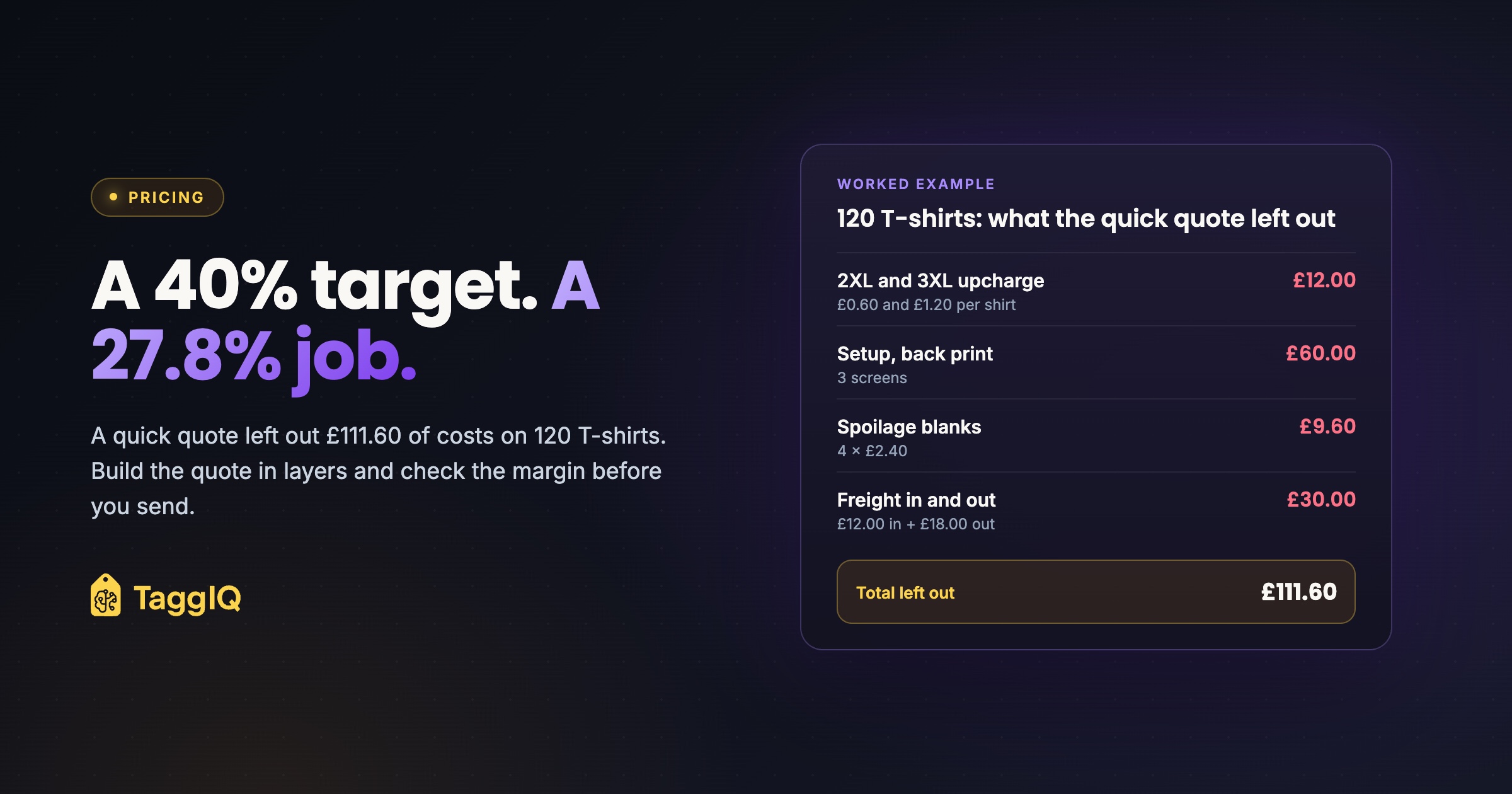
Missed layers. 2XL and 3XL upcharge: £12.00. Setup for the back print (3 screens): £60.00. Spoilage blanks: £9.60. Freight in and out: £30.00. Total left out: £111.60.
The quick quote assumed a cost of £549.00 and priced it at £549.00 ÷ 0.6 = £915.00, expecting 40%. The real cost is still £660.60, so gross profit is £254.40 and the margin is 27.8%. That is £186 less than the full quote, on the same work, or about 42% of the £440.40 profit the job was meant to make.
None of those misses is large on its own. Together they take out a large slice of the job’s profit, and the quote still looked as though it hit the target margin.
A reusable apparel quote worksheet with a margin check
Turn the build above into a template with one row for each layer. The point is not the spreadsheet itself. Use one cost row for each layer so every quote is checked the same way, whoever builds it. For the customer-facing document, this quote template covers the details the customer needs to confirm.
| Row | What goes in | Watch for |
|---|---|---|
| Blanks by size band | Quantity × supplier price at the right break | 2XL+ upcharges; breaks priced per style, not across the whole order |
| Spoilage | Extra blanks, rounded up | Dark garments, awkward placements |
| Setup, each location | Colours (one screen each) × screen price, or digitising per logo | Repeat orders with screens or files on file |
| Artwork | Separations, redraws | Customer files that are not print-ready |
| Run, each location | Quantity × rate for tier and colours or stitch band | Tier changes if the quantity moves |
| Packing and finishing | Per piece | Individual bagging, labelling, kitting |
| Freight in | Carriage on blanks | Number of cartons, not a flat guess |
| Freight out | Delivery to customer | Split deliveries to several addresses |
| Total cost | Sum of the rows above | Job costs only, no overhead |
| Selling price | Total cost ÷ (1 − target margin) | Rounding on unit prices |
| Margin check | (Selling price − total cost) ÷ selling price | Must match your target before sending |
The margin check row matters most. It turns the quote into the point where you decide your margin, instead of the point where you lose it. You can run the check with the profit margin calculator before the quote goes out. If you later agree a discount, you know exactly what margin you started from. For the wider question of what your target should be, the promotional products pricing guide works through the thinking. Keep the rows in the same order so the next quote does not start from memory.
Re-check blank prices on every quote rather than using last season’s list. Supplier prices move, and a worksheet is only as good as the numbers you put in it.
Embroidery uses the same rows
For embroidery, the setup row becomes digitising, usually charged once per logo. The run row is set by stitch count band and quantity tier, not by number of colours. Everything else stays the same. For a single-logo job, see the embroidery quote example, line by line. For more on how decoration setup and run charges affect margin, the same margin calculation is worked through there.
Audit your last three apparel quotes with the worksheet
Take your last three apparel quotes and run them through the worksheet. Look for missing upcharges, setup for second locations, and freight. Compare the margin you meant to make with the margin you actually quoted. The gap tells you which row your shop forgets most.
If you want some of these rows handled for you, the TaggIQ quote builder calculates setup fees per decoration location rather than per item and keeps setup separate from per-unit costs. It also handles quantity break pricing. Keep the margin check as your last step, whichever tool you use.
See the quote builder Compare your quote workflow with TaggIQ’s setup-fee and quantity-break tools.
Frequently asked questions
Should setup always be a separate line on the quote?
Not always. Some corporate buyers want one all-in price per item. You can still work out setup on its own row and then fold it into the unit price, as long as the quote says the price is valid only at that quantity. If the quantity changes, the quote gets recalculated rather than simply pro-rated.
Do I charge setup again on a repeat order?
Many decorators charge a lower setup fee, or none, when the screens or digitised files are still on file. Whatever you decide, write the policy into your terms and show the reduced setup as its own line, so the customer can see the saving and the next quote starts from the same rule.
What target margin should I use?
There is no single right figure. Your target has to cover overhead and leave a profit at the volume you actually run. Work out your monthly overhead, estimate the gross profit your typical jobs produce, and set a target that closes the gap. Then use the same figure on every quote so the margin check means something.

Dave
Dave writes for TaggIQ about running a profitable print, promo, sign and embroidery business: costing and estimating, margins, production flow, order workflows, pricing decisions and keeping customers coming back.