In this article 14 sections
- Why the fear is reasonable
- The two failure patterns to avoid
- Before week one: four decisions
- Find out who already uses AI
- Pick one task
- Name one champion
- Write a one-page usage guide
- What to tell your team
- The four-week rollout plan
- The weekly 20-minute review
- Measure it, don't feel it
- Week four: expand, adjust or stop
- What the time is for
- Where TaggIQ fits
You have paid for an AI tool, or you are about to. Half your team is quietly worried it means fewer jobs. The other half has started using it in their own way, and the quotes going out no longer sound like your print or apparel shop.
The short answer: don’t launch AI across the shop. Run a four-week pilot on one task, with one champion and one weekly review habit. Tell people plainly what the tool is for and what it is not for before anyone logs in.
Why the fear is reasonable
Your staff are not being difficult. In a Pew Research Center survey of US workers published in February 2025, 52% said they feel worried about how AI may be used in the workplace in the future, and 36% said they feel hopeful. In the same Pew report, about one in six workers (16%) say at least some of their work is done with AI.
So your team is probably starting from worry, with little hands-on experience. If you announce AI and say nothing about jobs, people fill the silence themselves. Anxious staff avoid the tool or use it badly, and you pay for software nobody trusts.
The two failure patterns to avoid
Fear: the owner announces “we’re using AI now” with no detail. Staff assume the worst. Adoption stalls.
Chaos: everyone gets a login on day one with no agreed task. One person drafts quotes with it, another pastes customer artwork into it, a third ignores it. Output quality varies by who is at the desk. Quotes go out with prices nobody checked.
The four-week plan below closes both gaps. It is small enough to stop after a month with little lost if the task doesn’t pay back.
Before week one: four decisions
Find out who already uses AI
Ask the team, without blame, who already uses AI for work and for what. Then set two rules. Pilot work moves onto one tool the shop controls. Any other use involving customer data pauses until the week-four decision.
Invite the people already using it to share what they have learned at the first review.
Pick one task
Choose something low-risk, repetitive and easy to check. Good first tasks in a print or apparel shop:
- Drafting replies to quote requests
- Summarizing a customer’s order history before a call
- Drafting quote follow-up emails
Avoid anything where a mistake reaches production or sets a price without review. For a fuller list of where AI should never have the final word, see what you should never let AI decide in your print shop.
Name one champion
The champion tries the tool first, collects examples and helps colleagues. Pick a curious staff member, not the owner. When the owner is the only champion, adoption stops the week the owner gets busy.
Give the champion protected time, even 30 minutes a week, so it is part of their job rather than an extra.
Write a one-page usage guide
Keep it to one page. It should answer three questions:
- What may go into the tool? For example: job specs and product names yes, customer payment details no. Before allowing customer details or artwork, check the tool’s data-use settings, its terms and your customer agreements, read the FTC’s guide to protecting personal information, and check your own obligations.
- What must a person check? Prices, quantities, dates, decoration method and tone.
- Who owns the final output? The person who sends it, every time.
The rule underneath it all: AI drafts, a person checks and sends. Our guide to templates and guardrails for shop staff has more on writing this page.
What to tell your team
Have this conversation before anyone logs in. Be specific about jobs. Vague reassurance sounds like a warning.
A script you can adapt
“We’re trying an AI tool for four weeks on one job: drafting replies to quote requests. [Champion’s name] will try it first and help everyone else. The tool writes a first draft. A person always checks the price, the details and the tone before anything goes to a customer. Nothing goes out without a person approving it. This is about getting quotes out faster, not about cutting roles. [State honestly what you expect to change, for example: ‘Sam will spend less time typing and more time following up on open quotes.’] Every week on [day, e.g. Tuesday] we’ll take 20 minutes to talk about what worked and what didn’t. If it doesn’t help, we stop.”
Only say what is true for your shop. If you don’t yet know how roles will change, say that, and say when you will know.

The four-week rollout plan
Here is the plan as a template. Copy it, swap in your task and names, and pin it where the team can see it.
| Week | Focus | Who | What “done” looks like |
|---|---|---|---|
| 0 (before) | Baseline and guide | Owner and champion | Current time per task measured; one-page guide written; team told |
| 1 | Champion tries it alone | Champion | 5 to 10 drafts made; notes on what needed fixing |
| 2 | One more person joins | Champion plus the person who does the task daily | Shared prompt or template agreed; tally sheet in use |
| 3 | Everyone who does the task uses it | All relevant staff | Same template used by all; every draft checked before sending |
| 4 | Decide | Owner, champion, users | Compare to baseline; expand, adjust or stop |
The weekly 20-minute review
Same day, same time, every week. Three questions only:
- What worked?
- What went wrong, or needed a major rewrite?
- What should we stop doing?
Write the answers down. Update the usage guide when something changes. This habit is what keeps use consistent across the team.
Measure it, don’t feel it
Gut feel will mislead you in both directions. Keep a tally sheet next to the task with two columns: minutes per draft, and whether the draft needed a major rewrite. Measure your baseline in week 0 the same way.
Worked example
A 6-person embroidery and print shop: one owner, one quoting person, two production staff and two in admin and customer service. The chosen task is drafting replies to quote requests.
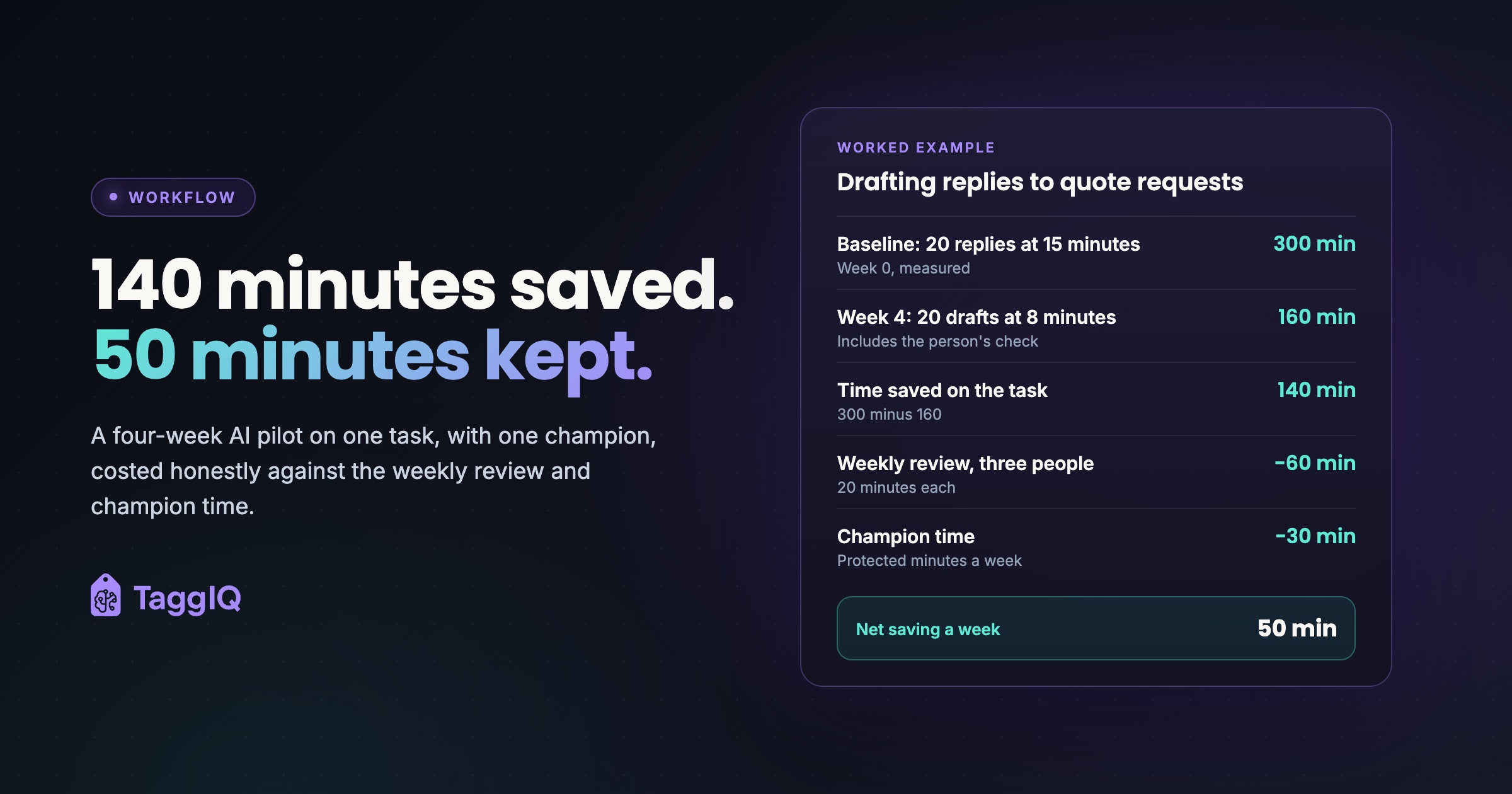
Baseline (week 0): about 20 quote replies a week at 15 minutes each = 300 minutes, or 5 hours a week.
Week 4 tally: drafts now take 8 minutes each, including the person’s check = 160 minutes. 3 of the 20 needed a major rewrite.
Time saved on the task: 300 − 160 = 140 minutes a week.
Cost of the review habit: a 20-minute meeting with three people (owner, champion, quoting person) = 60 staff minutes a week.
Cost of champion time: 30 protected minutes a week, on top of drafting and the review.
Net saving: 140 − 60 − 30 = 50 minutes a week during the pilot. Once the template settles and the review moves to every other week, the meeting cost halves.
All figures are illustrative. Use your own tally.
Notice what the example counts. The review meeting and the champion’s time are real costs, so they come off the saving. Every extra person in the room adds meeting time without adding any saving. Keep the review to the people who do the task.
Also watch the rewrite column. If one draft in three needs a major rewrite, the template or the inputs need work before you expand.
Week four: expand, adjust or stop
Use a simple decision rule:
- Expand when time per task is clearly down and major rewrites are rare. Add a second task and keep the same champion and review habit.
- Adjust when time is down but rewrites stay high. Run two more weeks with a better template or clearer input rules.
- Stop when time saved barely covers the review cost. You have lost a month, not a year, and your team has seen you keep your word.
What the time is for
Tell your team where the saved time goes. Faster quote turnaround is a strong answer: on short-deadline promo and apparel orders, the shop that replies first is in a better position to win the job. Freed minutes can also go to following up open quotes or calling repeat customers.
When people see the time going to more useful work, not fewer jobs, the fear eases. If your shop still runs quoting from spreadsheets and email, it can help to read what moving from spreadsheets to a system really involves first. AI drafts are only as good as the customer and pricing records they draw on.
Where TaggIQ fits
If your pilot task is quoting or customer replies, TaggIQ’s AI features are built around the same human-approval rule. The AI can pull customer history, apply pricing tiers and calculate decoration costs for your approval. It drafts outreach replies to match your tone and never sends without your sign-off.
See TaggIQ AI See how TaggIQ's AI drafts quotes and replies for your team to check and approve.
Frequently asked questions
What if my best quoting person refuses to use it?
Don't force it in week one. Make someone else the champion and let the results speak at the weekly review. Ask the reluctant person to check AI drafts for accuracy; their experience makes them the best reviewer you have.
Should I tell customers we use AI for drafts?
Decide it deliberately and record the decision in the one-page guide. Check your own disclosure and data-handling obligations before you settle it. Whatever you decide, a person checks and sends every message.
Can I run two tasks at once to save time?
Resist it. Two tasks means two templates, two baselines and a review that runs long. Finish one four-week cycle, then add the second task with the same champion and habit.

Emma
Emma writes for TaggIQ about practical AI and automation for print, promo, sign and embroidery businesses: AI assistants and agents, quoting and follow-up workflows, customer experience and keeping people in charge of the decisions that matter.