In this article 12 sections
- Start with how AI already arrives
- Where AI goes wrong in a decorated-goods shop
- What one wrong quote email costs
- The one-page policy, part by part
- 1. Approved tools
- 2. Data rules: green, amber, red
- 3. Approved prompts
- 4. Review rules
- 5. Ownership and mistakes
- The page itself
- Build accuracy into the setup, not just the checking
- What to do this week
Your team already uses AI. Someone drafts quote emails in a chat window, someone else writes product descriptions for the webstore, and nobody is quite sure what gets pasted in or how closely the answers get checked. The real risk is a confident wrong price, a ship date nobody promised, or a customer list sitting in a personal free account.
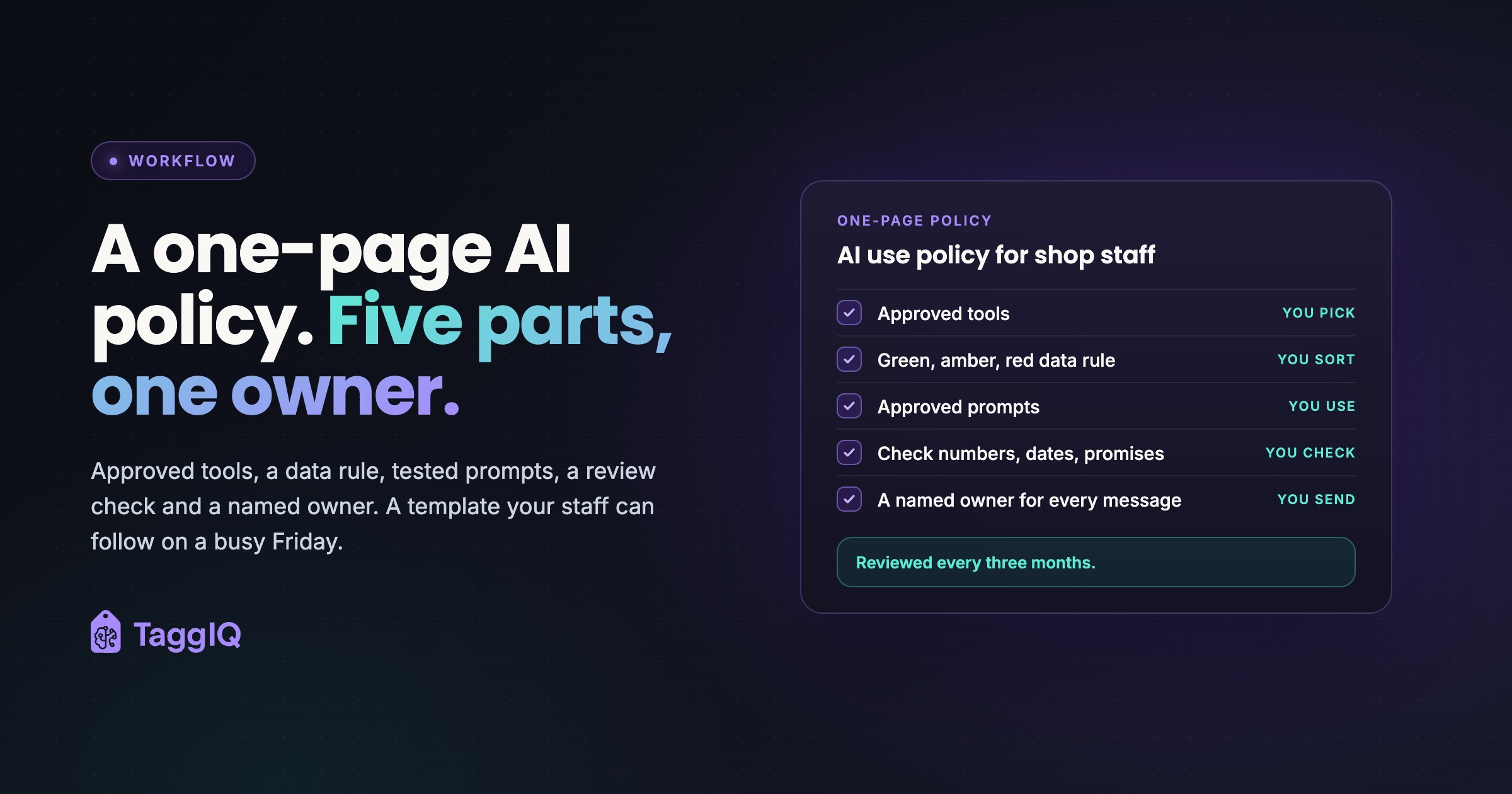
The short answer is a one-page AI use policy with five parts: approved tools, a data rule, approved prompts, a review rule, and a named owner for every message.
This is general guidance, not legal advice. Check your own obligations, especially around customer data and advertising claims, with a qualified adviser.
Start with how AI already arrives
Before banning AI, look at how it already arrives at work. In Microsoft and LinkedIn’s 2024 Work Trend Index, 80% of AI users at small and medium-sized companies said they bring their own AI tools to work, and 52% of people using AI at work said they were reluctant to admit using it for their most important tasks. The survey covered 31,000 knowledge workers in 31 markets.
That is the starting point for your rules: staff choosing their own tools and not always saying so. Simple written rules give that use a visible, approved route, so you can see which prompts work and fix the ones that do not.
Where AI goes wrong in a decorated-goods shop
Generic AI policies talk about “sensitive data” and “hallucinations” (confident answers the model made up). In a print, promo, sign or embroidery shop the failure points are more specific, and each one has a check that catches it.
| Risk area | What goes wrong | The check |
|---|---|---|
| Prices and quantity breaks | Plausible prices from an old list, or from nowhere | Match every price to your current price list or quoting system |
| Setup and decoration fees | A flat “setup fee” where you charge per screen, per color or per digitized file | Match against your decoration rules |
| Lead times and ship dates | The AI “confirms” a date it has no data for | Check the production schedule before any date goes out |
| Decoration specs | Wrong imprint area, stitch count or thread colors | Check against the proof or job ticket |
| Product claims | “Eco-friendly”, “made in USA” or “fire-retardant” with nothing behind it | Delete any claim you cannot find in supplier documentation |
| Customer artwork | Implying the customer owns exclusive rights to a purely AI-generated logo | Check before promising ownership (see below) |
| Reviews and testimonials | AI-written reviews for your site or listings | Never, no exceptions |
Two of these have clear official positions. The FTC’s final rule on reviews and testimonials, announced August 14, 2024, bans fake reviews that misrepresent who wrote them, naming AI-generated fake reviews as an example, and lets the FTC seek civil penalties against knowing violators.
On artwork, the U.S. Copyright Office concluded in January 2025 that AI output can be protected by copyright only where a human author has determined sufficient expressive elements, and that prompts alone are not enough. Using AI to assist a designer does not bar protection. The practical rule for the counter: be careful what you promise about ownership of anything the AI produced on its own, and point the customer to their own IP adviser if exclusivity matters to them. Check how both positions apply to your shop with a qualified adviser.
What one wrong quote email costs
Worked example
All figures are illustrative. A six-person apparel and promo shop gets a request for 200 tees with a 2-color front print. A staff member pastes an old price list into a chat tool and asks for a quote email. The draft reads well. It quotes $7.50 a piece (the 500-piece price on the old list), a 12-piece minimum and a single $35 setup fee. The shop’s real rules are $9.00 a piece at 200, a 24-piece minimum and a $50 screen fee per color.
The customer accepts by return, and the shop decides to honor the quote.
- Correct quote: 200 x $9.00 = $1,800, plus 2 screens x $50 = $100. Total $1,900.
- Honored quote: 200 x $7.50 = $1,500, plus $35. Total $1,535.
- Direct job costs, the same either way: blanks $700 (200 x $3.50), ink and supplies $60, screen materials $30, press labor $90 (3 hours at $30). Total $880.
- Gross margin before overhead, correct quote: $1,900 minus $880 = $1,020 (53.7%).
- Gross margin before overhead, honored quote: $1,535 minus $880 = $655 (42.7%).
The error costs $365, about 36% of the job’s margin. Rent, software and the owner’s time are not in these numbers; they still have to come out of what is left.
Now price the check. Say the team sends 40 AI-drafted customer messages a week and each check takes 2 minutes. That is 80 minutes a week, or $40 at $30 an hour. One error of this size covers about nine weeks of checking.
Notice where the error came from: the AI worked from pasted text, not from the shop’s real prices. Checking catches that. Better prompts and better data sources reduce the chance of it happening, but they do not replace the check.
The one-page policy, part by part
1. Approved tools
Name the tools staff may use and the account type for each. Read each tool’s terms for three answers, and write down the date you checked: does it train on your data by default, and can you switch that off? How long are conversations kept? Are there admin controls over staff accounts? The SBA’s small business guidance adds two rules worth copying: it advises against feeding sensitive or proprietary information into AI tools and recommends that a person review what free tools produce.
Your own privacy policy matters too. In January 2024, the FTC’s Office of Technology told AI companies that commitments must be honored “regardless of how or where” they were made, and concluded that “There is no AI exemption from the laws on the books.” That post was aimed at AI providers, so treat this as an analogy: if your policy tells customers how their details are used, pasting those details into a tool with unclear terms can put you at odds with your own promise. Check your own privacy obligations with a qualified adviser.
2. Data rules: green, amber, red
| Color | What it covers | Rule |
|---|---|---|
| Green | Your own marketing text, public product information, generic care and spec wording | Paste freely into approved tools |
| Amber | Customer names, order numbers, order details, email threads | Strip names and contact details first; use placeholders like [CUSTOMER] |
| Red | Payment details, passwords, customer contact lists, artwork a customer marked confidential, supplier net pricing, anyone else’s personal data | Never goes into any AI tool |
3. Approved prompts
An approved prompt is a tested instruction everyone uses for a repeat job, so quality does not depend on who is at the counter. Each one says where the facts come from, what tone to use, and what to do when information is missing. That last instruction is the guardrail: it gives the AI a way to say “I don’t know” instead of guessing.
Three approved prompts to adapt
Quote cover email. “Write a short, friendly cover email for the quote below. Use only the prices, quantities, fees, decoration details and dates in the quote text. Do not add any price, fee, minimum, date or product detail that is not in it. If the customer asked about something the quote does not cover, write [CHECK: what is missing] instead of answering. Start with Hi [NAME]. Quote text, with the customer’s name, company, address and contact details removed or replaced by [NAME] and [COMPANY]: [paste from your quoting system].”
Product description. “Write a 60-word webstore description of [product] using only the supplier facts below. Do not claim anything about origin, sustainability, fire resistance or wash durability unless it is in the facts. After the description, list under UNSUPPORTED any claim you wanted to make but could not back up. Facts: [paste spec sheet text].”
Proof approval reminder. “Write a polite two-sentence reminder that the proof for order [ORDER] is waiting for approval and that production starts only once it is approved. Do not mention any ship date or price.”
The quote prompt strips customer details, so it follows the amber rule, and it takes prices from your quoting system, not from a price list someone saved months ago. Had the worked example’s draft started there, it would have used current prices, though the review rule still applies. Keep the prompts in one shared document with the date each was last tested. For keeping your shop’s voice in these drafts, see writing customer emails with AI that still sound like you.
4. Review rules
The core rule fits on a sticky note: anything with a number, a date, a promise, a spec or a name is checked against your system of record before a customer sees it. The system of record is wherever the true answer lives: your quoting system, production schedule or job ticket.
Some categories get a second person:
- Quotes and price changes
- Ship dates tied to an event
- Decoration specs: imprint area, stitch count, ink or thread colors
- Origin, eco or safety claims
- Anything that sounds legal
In a two- or three-person shop, set a job value above which the second check applies. If you quote alone, re-read the draft against the quote screen after a short break.
One more firm rule: no AI tool sends a customer email on its own. A person reads it and presses send. For the decisions that should stay with people entirely, see what you should never let AI decide in your print shop.
5. Ownership and mistakes
Whoever sends the output owns it, whatever tool drafted it. Treat this as a house rule, not a legal conclusion: if a message goes out under your shop’s name, the person sending it checks it as the shop’s answer.
Make reporting a mistake quick and blame-free. Name one person to tell, fix the prompt or data source that caused it, and note the fix in the prompt document. If red data went into a personal or unapproved tool, tell that person the same day, delete the conversation, check the tool’s history and retention settings, and decide with a qualified adviser whether anyone needs to be told. Review the whole page every quarter, because tools and their terms change.
The page itself
One-page AI use policy (copy and adapt)
1. Approved tools. [Tool, account type, date terms were checked]. No other AI tools for shop work without asking [OWNER].
2. Data. Green: public and generic text, paste freely. Amber: customer and order details, strip names and contact details first. Red: payment details, passwords, contact lists, confidential artwork, supplier net pricing. Never paste red.
3. Prompts. Use the approved prompts in [shared folder]. Found a prompt that works better? Send it to [OWNER] to test and add.
4. Review. Check every number, date, promise, spec and name against [quoting system, schedule, job ticket] before a customer sees it. Get a second check on quotes over [$ VALUE], event dates, decoration specs and product claims. Quoting alone? Re-read against the quote screen after a break. AI never sends to customers directly. No AI-written reviews or testimonials.
5. Ownership. You send it, you own it. Spot an AI mistake? Tell [NAME] the same day. Pasted red data? Tell [NAME] the same day and delete the conversation. No blame; we fix the prompt.
Reviewed: [date]. Next review: [date plus three months].
Build accuracy into the setup, not just the checking
A policy relies on people remembering it on a busy Friday. The stronger design puts the guardrails into the system itself. When an AI assistant reads prices, decoration rules and order status directly from the shop’s records, there is no stale price list to copy from. Add an approval step before anything leaves the building and a log of what the AI did, and the policy is backed by how the tools work. For how this fits alongside a promo shop’s existing software, see the 5 tools every promo shop uses, and where one AI agent fits.
That is the principle TaggIQ’s AI is built on. A supported MCP assistant (Model Context Protocol, a way to connect an AI assistant to business software) can read and write TaggIQ records. Quotes are built from customer history, the customer’s pricing tier and decoration calculated from your own decoration rules, for your approval. Nothing goes to customers, suppliers or your books without explicit confirmation, the AI cannot create payments or credit notes or change tax fields, and every AI tool call is logged in an audit trail you can review.
What to do this week
- Ask the team, openly and without blame, which AI tools they use now and for what, including AI features built into email, design and website software you already use.
- Pick your approved tools and account types, and read their data terms.
- Write three approved prompts for your most repeated customer messages.
- Fill in the one-page template and walk the team through it in 15 minutes.
- Put the first quarterly review in the calendar.
See how TaggIQ AI works See how TaggIQ grounds AI in your own records and keeps every customer-facing action behind your approval.
Frequently asked questions
Is a one-page policy enough to protect the shop legally?
It is an operating document, not a legal one. It sets daily habits for staff; it does not replace your privacy policy, employee handbook or professional advice on your obligations. If you want a fuller structure, NIST's Generative AI Profile (NIST AI 600-1, July 2024) is a voluntary companion to its AI Risk Management Framework and is free to read.
Do we have to pay for business accounts?
Let the three checks under approved tools decide: training by default, how long conversations are kept, and admin controls. Those answers, not the plan's name, decide whether paying is worth it. If a tool's terms give no clear answer on training and retention, allow only green data in it.
A customer wants us to design their logo with AI. What do we say?
Be clear about how the artwork is made. Use AI for early concepts, have a designer develop the final artwork, and keep the working files that show the human design decisions. If the customer needs exclusive ownership, say so plainly and suggest they take IP advice before relying on it.

Emma
Emma writes for TaggIQ about practical AI and automation for print, promo, sign and embroidery businesses: AI assistants and agents, quoting and follow-up workflows, customer experience and keeping people in charge of the decisions that matter.